
Security Operations Center (SOC) hiring managers rarely evaluate candidates solely on textbook definitions of CIA triad principles or TCP port numbers. In a modern cybersecurity soc analyst incident triage interview, panels simulate the high-pressure reality of a live alert queue: "You are an on-shift SOC analyst at 02:15 UTC. A high-severity SIEM alert fires for suspicious PowerShell execution on a finance workstation, followed two minutes later by an anomalous Okta MFA push from an unfamiliar ASN. How do you triage both signals, separate true intrusion from administrative noise, and contain blast radius without needlessly locking out an executive?"
Candidates who rush to extreme actions—such as immediately wiping a laptop before collecting volatile memory, or blindly closing alerts as false positives because a hostname looks familiar—fail the assessment. Hiring teams use live triage scenarios to evaluate structured hypothesis testing, cross-telemetry correlation across EDR, IAM, and network logs, and disciplined escalation under time pressure.
This guide breaks down the end-to-end incident triage framework, real SIEM query patterns, "You Are a SOC Analyst..." live case studies, and the exact L1-to-L3 evaluation rubric interviewers use to score responses.
Reactive Queue Clearing vs. Hypothesis-Driven Triage
A recurring theme in every soc analyst interview is how a candidate manages alert fatigue without missing stealthy attacker lateral movement. Weak candidates treat the SIEM queue as a linear checklist to clear as fast as possible. Strong analysts treat every high-fidelity alert as a testable hypothesis across three telemetry planes: Endpoint (EDR), Identity (IAM/IdP), and Network/Proxy Flow.
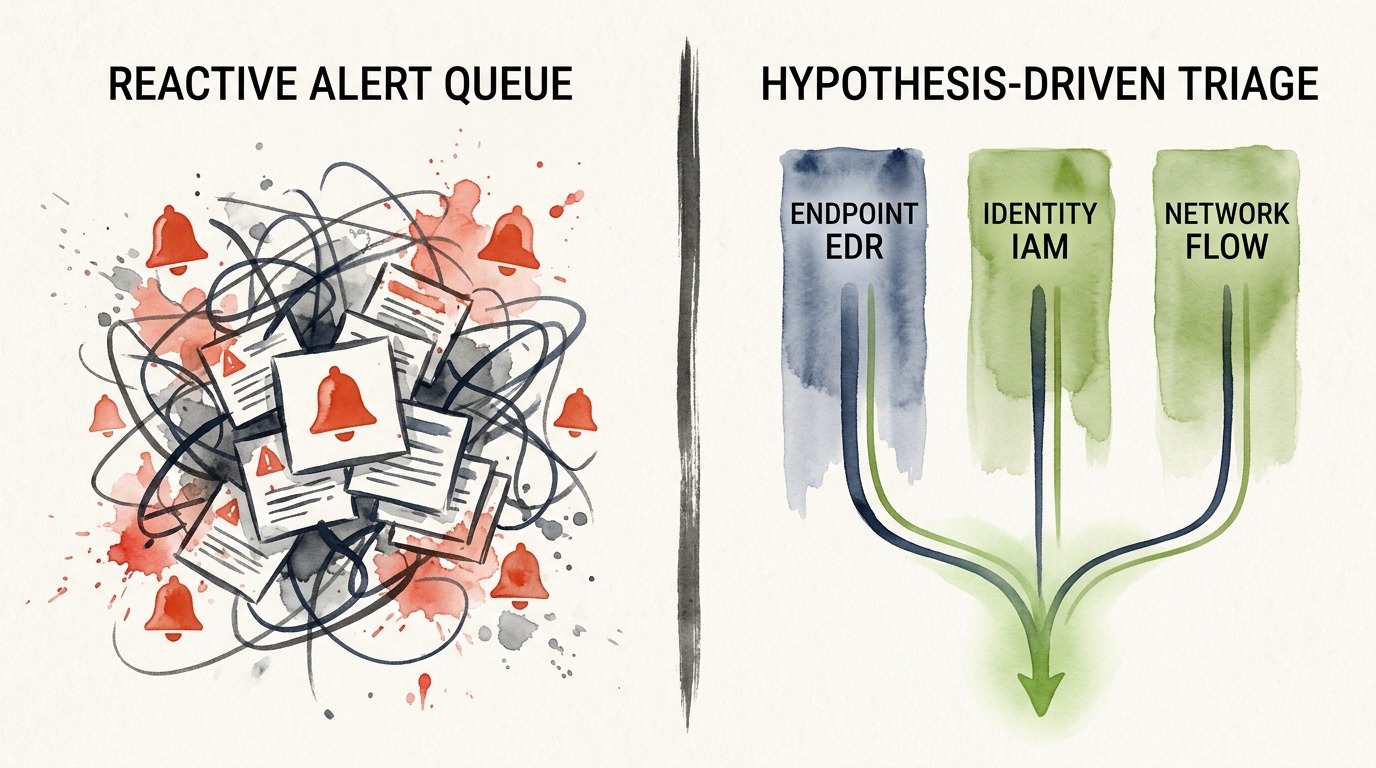
When an interviewer presents an alert, resist the urge to jump straight to remediation commands. Instead, articulate a structured triage thesis:
- Validate the Trigger: Confirm what specific detection rule fired, which log source generated it, and whether the underlying telemetry is complete or truncated.
- Establish Baseline Context: Identify the asset owner, business criticality, installed software profile, and recent change tickets or vulnerability scan windows.
- Pivot Across Adjacent Telemetry: Never judge an endpoint alert in isolation. Correlate process trees against identity sign-in events, DNS queries, and firewall egress logs within a ±15-minute window.
- Classify the Disposition Accurately: Assign one of three crisp verdicts—True Positive (Malicious), Benign True Positive (Authorized Administrative or Red-Team Activity), or False Positive (Broken or Overbroad Detection Logic)—before deciding whether to contain, escalate, or tune.
Just as Site Reliability Engineering incident triage relies on isolating fault domains before applying risky mitigations, SOC triage relies on proving scope before cutting network access.
The Five-Stage SOC Incident Triage Lifecycle
Interview panels expect candidates to walk through a repeatable lifecycle rather than ad-hoc log searches. Explaining how each stage feeds back into detection engineering signals senior operational maturity.
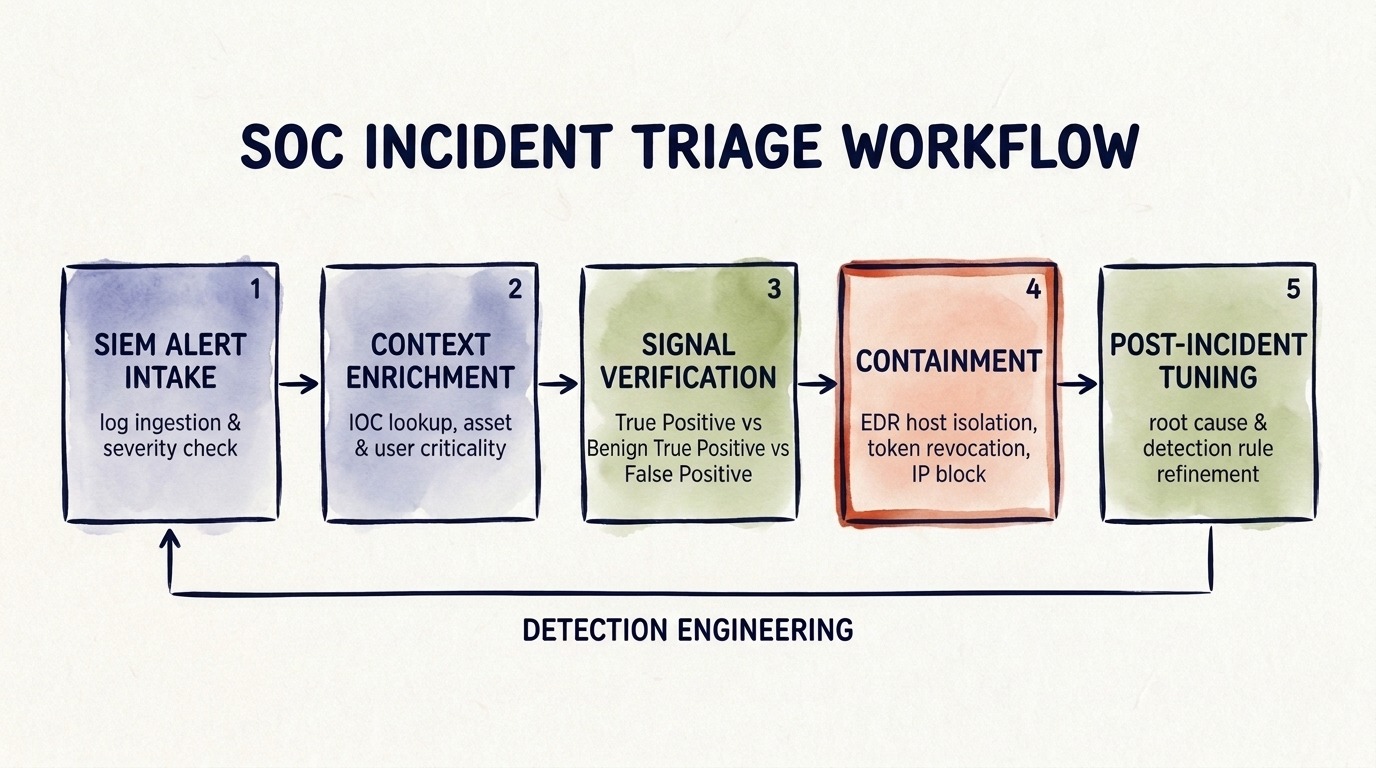
1. SIEM Alert Intake and Scope Bounding
Begin by inspecting the raw event fields rather than trusting the alert summary title alone. Key fields to extract immediately include:
- Temporal Anchors: Exact UTC event timestamp, ingestion delay, and sequence relative to surrounding alerts.
- Entity Identifiers: Hostname, internal IP, MAC address, user principal name (UPN), and session ID.
- Process Lineage: Parent process (
ParentImage), child process (Image), command-line arguments (CommandLine), and execution integrity level (SYSTEMvs. standard user).
2. Context Enrichment and IOC Validation
Before pivoting to containment, enrich indicators of compromise (IOCs) without tipping off a potential adversary:
- Hash & Binary Reputation: Check SHA-256 hashes, Authenticode signatures, and file path prevalence across the fleet (for example,
svchost.exerunning fromC:\Users\Public\instead ofC:\Windows\System32\). - Network & Infrastructure Context: Inspect ASN ownership, domain registration age, passive DNS history, and VirusTotal or abuse telemetry for external IPs.
- Identity & Asset Criticality: Verify whether the target host is an ephemeral build runner, a developer workstation, or a Tier-0 Domain Controller, and whether the user holds privileged admin roles.
3. Signal Verification and SIEM Query Pivoting
Interviewers often ask how you would write a quick search in Splunk (SPL) or Microsoft Sentinel (KQL) to verify whether an activity is isolated or spreading across hosts. Demonstrating concrete query fluency sets strong candidates apart:
// KQL: Hunt for encoded PowerShell spawned by Office apps or browsers across all endpoints
DeviceProcessEvents
| where Timestamp > ago(24h)
| where FileName in~ ("powershell.exe", "pwsh.exe")
| where InitiatingProcessFileName in~ ("winword.exe", "excel.exe", "outlook.exe", "chrome.exe")
| where ProcessCommandLine has_any ("-enc", "-EncodedCommand", "FromBase64String", "IEX")
| project Timestamp, DeviceName, AccountName, InitiatingProcessFileName, ProcessCommandLine
| order by Timestamp desc
If an organization runs Splunk, interviewers look for the same disciplined scoping in SPL:
index=edr sourcetype=process_rollup earliest=-2h
| search (ParentImage="*\\winword.exe" OR ParentImage="*\\excel.exe")
  (Image="*\\powershell.exe" OR Image="*\\cmd.exe")
| stats count min(_time) as first_seen max(_time) as last_seen values(CommandLine) by host, user
Notice what both queries accomplish in an interview answer: they move beyond a single host, check parent-child anomalies aligned with MITRE ATT&CK Execution (T1059), and surface blast radius (values(CommandLine) by host, user) in seconds.
4. Containment and Evidence Preservation
Once a True Positive is confirmed, explain proportional containment. Isolating a single workstation via EDR preserves RAM and disk artifacts for forensics while severing C2 egress. In contrast, resetting a compromised service account password without revoking active OAuth refresh tokens leaves an attacker logged in.
5. Eradication and Post-Incident Detection Tuning
Strong analysts close the loop. If an alert turned out to be a noisy Benign True Positive from an authorized IT patch script, recommend an exclusion scoped tightly to signed binary hash + parent service + specific service account—never a blanket exclusion on powershell.exe.
Alert Disposition Matrix: Classifying Signals Correctly
Hiring managers frequently test whether candidates confuse Benign True Positives with False Positives. Use the comparison matrix below to anchor your classification logic during live case studies:
| Disposition Class | Detection Logic Fired? | Actual Activity | Correct SOC Action | Common Interview Trap |
|---|---|---|---|---|
| True Positive (Malicious) | Yes | Confirmed unauthorized adversary behavior or malware execution. | Contain host/identity, preserve volatile artifacts, escalate to L2/IR, scope fleet-wide IOCs. | Wiping the machine immediately and destroying forensic memory/timeline evidence. |
| Benign True Positive | Yes | Legitimate behavior matching the rule (e.g., authorized vulnerability scanner, IT admin script, scheduled pen-test). | Verify change ticket or owner out-of-band; document proof; apply narrow, hash-scoped tuning if noisy. | Escalating a noisy Tier-1 page to the CISO without verifying scheduled maintenance windows. |
| False Positive | Yes (erroneously) | Rule triggered due to parser bug, misconfigured regex, or normal OS telemetry misrepresented as malicious. | Close with root cause explanation; file detection-engineering ticket to fix rule logic or log normalization. | Silently closing alerts repeatedly without fixing the underlying broken correlation rule. |
| False Negative (Missed) | No | Malicious intrusion occurred without firing an alert (discovered via threat hunt or external tip). | Open incident immediately, contain blast radius, write new Sigma/KQL rule to close visibility gap. | Assuming "zero SIEM alerts" guarantees zero compromise across cloud or SaaS logs. |
"You Are a SOC Analyst...": Three Live Incident Roleplay Prompts
Modern cybersecurity panels rely heavily on scenario roleplay. Below are three high-frequency "You Are a SOC Analyst..." prompts with structured walkthroughs you can adapt out loud.
Scenario 1: Impossible Travel + Suspicious Inbox Rule (Identity & Cloud)
Prompt: "You are a SOC analyst reviewing an Azure AD / Entra ID alert: the VP of Finance logged in from Chicago at 14:02 UTC and from Frankfurt at 14:11 UTC. Ten minutes later, an audit log records a new Outlook inbox rule forwarding emails containing 'wire' or 'invoice' to an RSS folder."
Model Triage Walkthrough:
- Do not assume VPN immediately: While impossible travel alerts often stem from corporate VPN split-tunneling or mobile carrier IP geo-drift, the chained inbox forwarding rule raises the probability of a True Positive Business Email Compromise (BEC) dramatically (MITRE ATT&CK T1114.003 Email Forwarding Rule and T1564.008 Email Hiding Rules).
- Inspect Sign-In Telemetry: Check user-agent strings, device compliance status, authentication protocol (legacy IMAP/SMTP vs. modern OAuth), and whether MFA succeeded via an adversary-in-the-middle (AiTM) reverse proxy or MFA push fatigue.
- Contain Immediately: Revoke all active refresh tokens (
Revoke-MgUserSignInSession), disable the compromised account or enforce immediate password reset, delete the malicious inbox rule, and audit recent OAuth app grants (Consent to application) to ensure persistence was not established. - Escalate Scope: Check whether any internal finance staff or external vendors received spoofed payment instructions during the 20-minute window. Handling sensitive executive breaches calmly mirrors the structured stakeholder communication used in high-stakes workplace investigation interviews.
Scenario 2: Encoded PowerShell Spawning Certutil & LSASS Access (Endpoint)
Prompt: "EDR triggers a medium-severity alert:
winword.exespawnedcmd.exe, which launchedpowershell.exe -EncodedCommand ..., followed five seconds later bycertutil.exe -urlcache -split -fand a handle open request againstlsass.exe."
Model Triage Walkthrough:
- Recognize the Kill Chain Immediately: Even though the initial SIEM label says "medium," the parent-child chain (
winword.exe->cmd.exe-> encodedpowershell.exe) paired with living-off-the-land binary abuse (certutil.exefor T1105 Ingress Tool Transfer) and T1003.001 LSASS Memory credential access indicates an active hands-on-keyboard compromise. - Decode Safely Without Executing: Extract the Base64 string from the EDR command-line log and decode it in an isolated sandbox or CyberChef (
From Base64->Decode Text UTF-16LE) to uncover the staging URL and payload path. - Network Isolate, Do Not Shut Down: Trigger EDR Host Isolation immediately so the machine drops all network connections except the EDR management channel. Do not power off the host—active memory holds unencrypted indicators and injected processes needed by L2/DFIR responders.
- Pivot Across the Fleet: Search SIEM/EDR telemetry for the decoded C2 domain/IP and downloaded payload hash across all other endpoints, and force Kerberos TGT resets (
krbtgtassessment if domain admin credentials were exposed in LSASS). For cloud-hosted workloads, apply the same least-privilege isolation thinking covered in AWS IAM and VPC cloud security interviews.
Scenario 3: 400 Web Application Alerts from One Internal IP (Triage vs. Noise)
Prompt: "At 03:00 UTC, your WAF and IDS fire 400 SQL injection and directory traversal alerts targeting staging and production APIs from a single internal
/24subnet."
Model Triage Walkthrough:
- Check Asset Inventory and Change Calendar First: Before waking up the application security on-call lead, verify the source IP against internal vulnerability scanners (Qualys, Tenable, Nessus), synthetic monitoring nodes, and CI/CD DAST pipelines.
- Inspect HTTP Response Codes & User-Agents: True exploitation attempts often probe targeted endpoints with iterative payload variations and receive
200 OKor500database stack traces, whereas authorized scanners typically emit predictable scanner signatures (User-Agentheaders, sequential CVE checks) and hit403/404blocks. - Verify Out-of-Band: Confirm the scan window with the infrastructure or AppSec schedule. If authorized, classify as Benign True Positive and recommend maintenance-window suppression tags rather than disabling WAF SQLi rules globally.
Handling Unknown CVEs or Unfamiliar Log Formats Live
Even senior analysts encounter unfamiliar log schemas, proprietary SaaS audit formats, or newly disclosed CVEs during live panel interviews. Never bluff an answer or invent command flags. Instead, apply the reasoning techniques outlined in handling unknown technical interview questions gracefully:
- State explicitly what telemetry is missing and which log source you would query next (e.g., "I have not parsed that specific firewall vendor's field name, so I would verify whether
action=allowedmaps to egress TCP handshake completion or just policy evaluation before concluding exfiltration occurred"). - Anchor on universal attacker invariants: initial access, execution lineage, persistence mechanisms, credential access, and egress channels.
SOC Analyst Evaluation Rubric: L1 vs. L2 vs. L3
Use this rubric to calibrate the depth and altitude of your interview answers to the seniority level of the role:
| Seniority Level | Expected Triage & Technical Signals | Common Red Flags |
|---|---|---|
| L1 SOC Analyst (Triage) | Accurately distinguishes True Positive, Benign True Positive, and False Positive; enriches IPs/hashes; reads basic process trees and phishing headers; escalates clearly with timeline and IOCs. | Closes alerts without checking parent processes; cannot explain DNS vs. HTTP logs; asks to reboot or wipe infected machines before isolation. |
| L2 SOC Analyst (Responder) | Writes multi-table SPL/KQL correlation queries; maps attack chains to MITRE ATT&CK; performs memory-preserving EDR isolation and IAM token revocation; coordinates cross-team containment. | Treats alerts individually without hunting laterally; forgets OAuth/session persistence when resetting passwords; relies exclusively on automated SOAR playbooks without verification. |
| L3 / Lead SOC & Threat Hunter | Leads hypothesis-driven threat hunts without pre-existing alerts; designs Sigma/KQL detections that resist evasion; drives post-incident root-cause tuning and measurable MTTD/MTTR reductions. | Recommends broad exclusions that blind detection coverage; ignores business continuity trade-offs during containment; cannot articulate detection engineering lifecycle metrics. |
Candidates transitioning from adjacent technical or customer-facing roles can also strengthen cross-team communication framing by reviewing how technical discovery and incident communication and engineering leadership decision-making are scored in structured panels.
Practice Live SOC Incident Triage Interviews Under Time Pressure
Reading SIEM playbooks is straightforward when no clock is ticking; explaining a multi-stage OAuth and PowerShell intrusion to a skeptical security hiring manager in under two minutes is far harder.
Test your cybersecurity reflexes right now with the 60-Second Job Blitz—rapid-fire interview questions spanning Cybersecurity, Cloud Security, DevOps, and Engineering with zero login required. When you are ready for full voice-interactive mock interviews tailored to your exact SOC Analyst job description, explore totop.app pricing to drill live incident triage scenarios with Socratic AI follow-ups and seniority-calibrated feedback.
Practice Full Stack Engineer Questions Live with AI Mock Interviews
Turn any job description across Engineering, DevOps, Data, Marketing, Sales, Finance, or HR into a personalized test and live voice or text AI mock interview on totop.app, or test your speed right now in the 60-Second Full Stack Engineer Blitz.
Play 60s Full Stack Engineer Blitz (Free, No Login) | Start 14-Day Free Trial | Browse All Interview Guides