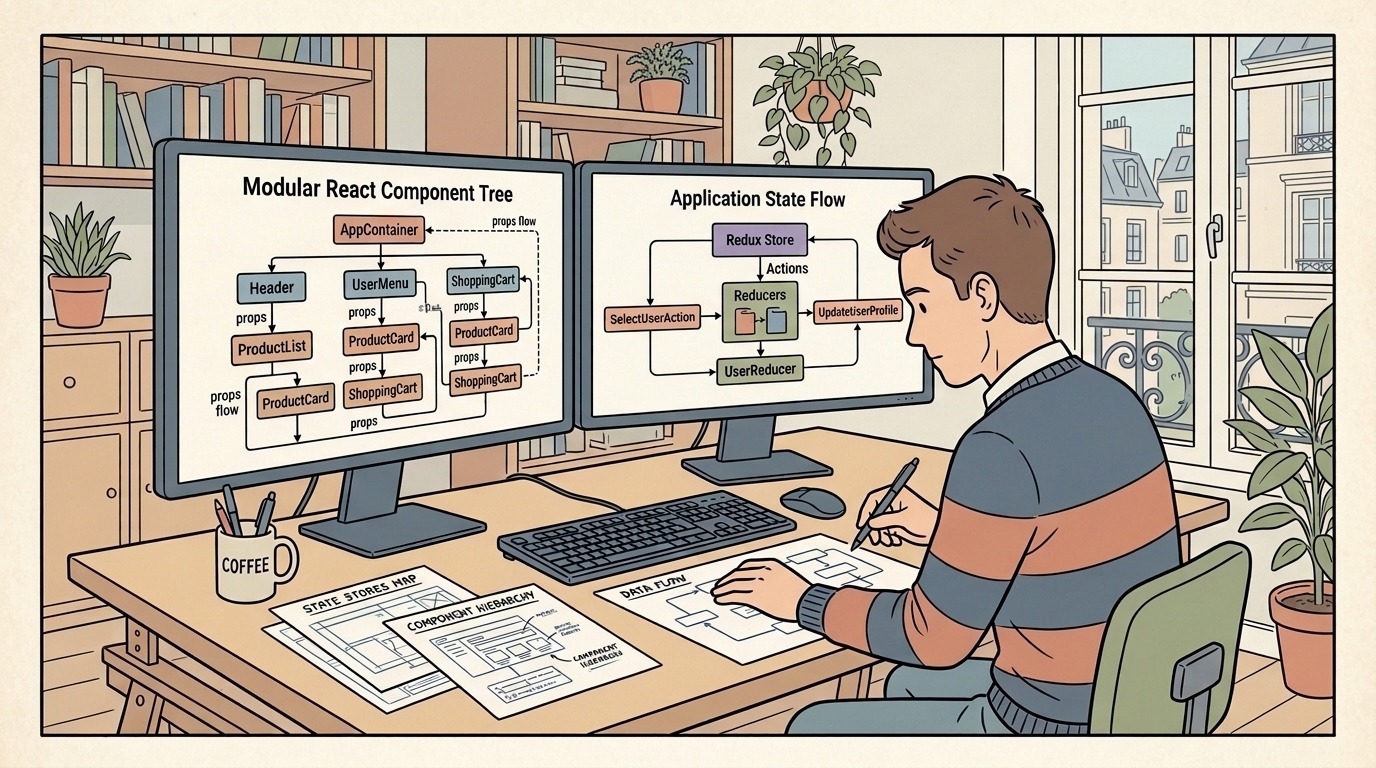
During senior frontend engineering interviews, one question consistently separates candidates who merely use libraries from engineers who understand the underlying browser runtime: "When do you choose React Context versus Redux Toolkit or Zustand, and how do their rendering mechanics differ?"
Many candidates answer with a superficial heuristic: "I use React Context for small projects and Redux for enterprise applications."
In modern technical loops, this answer is an immediate red flag. Application scale is not the primary determinant of state architecture. Volatility of state updates, subscription granularity, the React Fiber reconciliation pipeline, and the separation of client versus server state dictate whether an application maintains 60 frames per second or collapses under cascading re-render bottlenecks.
This guide provides a comprehensive technical breakdown of Redux Toolkit, Zustand, and React Context. We analyze their internal mechanics, evaluate real-world code implementations, diagnose production re-render failures, and detail how hiring panels evaluate candidate responses from junior to staff engineer levels.
The Core Technical Trap: Context Is Not a State Manager
The most common misconception in frontend interviews is treating React Context as an external state management solution.
React Context is a dependency injection mechanism. Its sole purpose is transporting values down the component tree without manually threading props through intermediate components (prop drilling).
React Context:
[Provider (Value: { user, theme, cart })]
    │
    ├── [Header Component] ───────────► Consumes user
    ├── [Main Content (No Context)]
    │       └── [Sidebar Component] ──► Consumes theme
    └── [Footer Component] ───────────► Consumes cart

Problem: When 'cart' updates, Header, Sidebar, and Footer ALL re-render!
The Fiber Tree Propagation Mechanism
When a value supplied to a <Context.Provider value={val}> updates, React relies on reference equality (Object.is) to detect changes:
- If
Object.is(previousValue, nextValue)evaluates tofalse, React marks every consumer component that invokesuseContext(MyContext)as dirty. - React schedules a re-render for all consumers in the fiber tree.
- Crucially, Context lacks an internal selector or partial subscription mechanism. Even if Component A only reads
value.themeand Component B updatesvalue.cart, Component A must re-render unless developers manually decouple the context into multiple independent providers or wrap subtrees in complex custom memoization wrappers.
External Stores and useSyncExternalStore
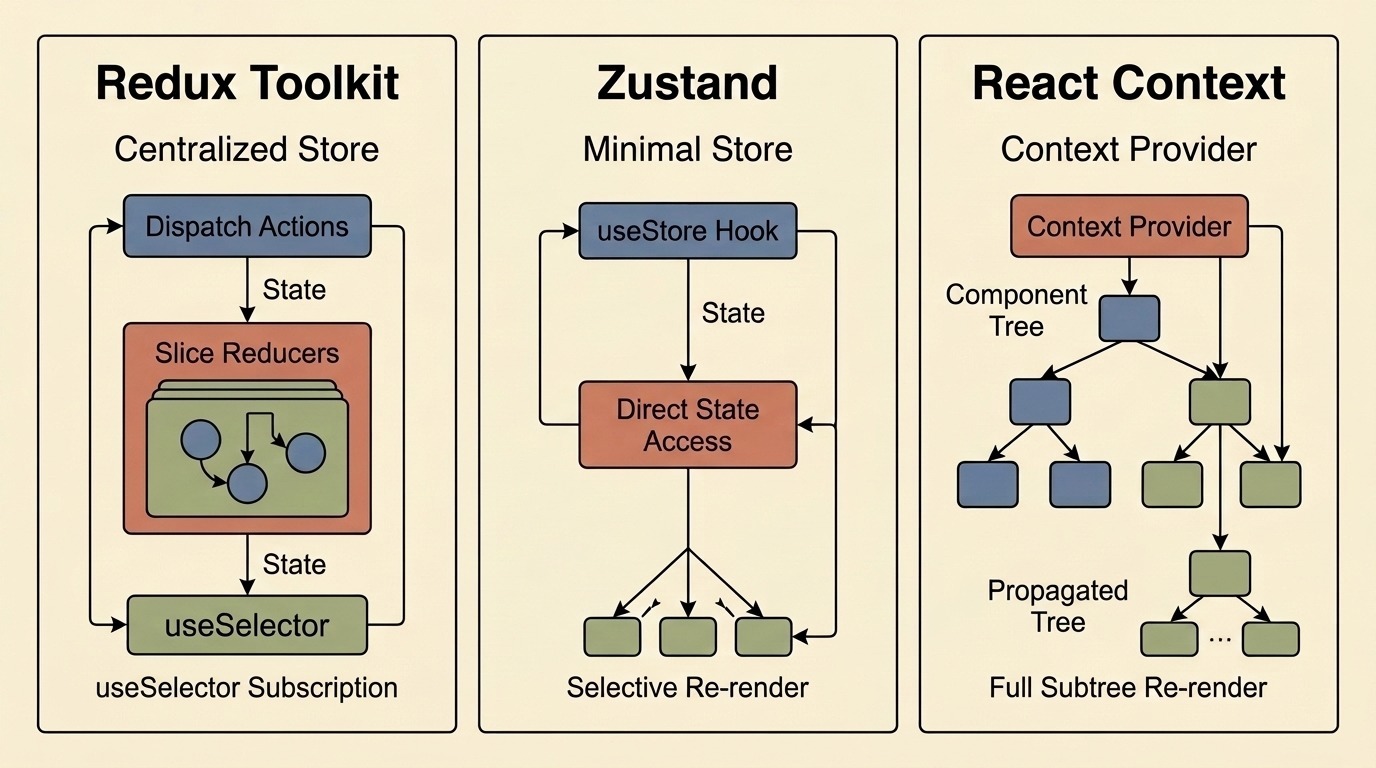
In contrast, libraries like Redux Toolkit and Zustand store their state outside the React fiber tree:
- The single source of truth lives in standard JavaScript closures or objects.
- React components subscribe to specific slices of that external state using the official
useSyncExternalStoreReact hook. - When an update occurs, the library checks whether the specific slice returned by the component's selector has changed. If the selected value is identical according to the comparator, the component bails out of rendering entirely.
Understanding this difference is critical when discussing the browser rendering pipeline and avoiding unnecessary layout recalculations.
Architectural Comparison: Redux Toolkit vs Zustand vs React Context
1. React Context: Built-In Dependency Injection
React Context is optimal for low-frequency, static, or ambient application data:
- Current authenticated user session metadata.
- Theme tokens (dark mode vs. light mode).
- Internationalization (i18n) locale and formatting dictionaries.
- UI framework configuration and routing parameters.
Strengths
- Zero additional dependencies or bundle overhead (native React API).
- Perfect for static configuration shared across deeply nested components.
- Scoped subtrees: You can mount multiple providers for different branches of your UI (such as isolated form contexts or dashboard widget containers).
Weaknesses
- High re-render cost for volatile state (e.g., text inputs, mouse coordinates, live websockets).
- Context hell: Complex applications often end up with dozens of nested provider wrappers (
<AuthProvider><ThemeProvider><SettingsProvider><CartProvider>...). - Debugging visibility: Inspecting global state transitions across multiple contexts requires specialized React DevTools inspection without native time-travel capabilities.
2. Redux Toolkit (RTK): Centralized Deterministic State Machine
Redux Toolkit is the modern, standardized evolution of Redux. It incorporates immer for immutable state updates, redux-thunk for asynchronous operations, and opinionated boilerplate-reduction helpers like createSlice.
Strengths
- Predictable State Transitions: Every state modification occurs through an explicit, serialized action dispatch handled by a pure reducer function.
- Unrivaled Developer Tooling: Redux DevTools offers comprehensive time-travel debugging, action log replay, and state snapshot imports/exports.
- Strict Architectural Boundaries: In large teams with dozens of contributors, RTK enforces rigid patterns that prevent ad-hoc state mutations.
- Middleware Ecosystem: Powerful middleware pipelines for telemetry, analytics tracking, persistence, and audit logging.
Weaknesses
- Bundle Footprint: RTK adds approximately 11–13 kB (minified and gzipped) to your initial client bundle.
- Boilerplate: Even with
createSlice, defining actions, reducers, extraReducers, and typed hooks requires more ceremony than minimal alternatives. - Learning Curve: Requires understanding actions, reducers, dispatch pipelines, selectors, and immutable data structures.
3. Zustand: Atomic External Store with Zero Boilerplate
Created by the Poimandres collective, Zustand has become an industry standard for client-side state management. It provides a hook-based API built on plain JavaScript closures and useSyncExternalStore.
Strengths
- Minimal Bundle Impact: Approximately 1.1 kB (minified + gzipped)—roughly one-tenth the size of Redux Toolkit.
- Zero Provider Requirement: Stores are created outside React and can be invoked directly as hooks (
useStore(selector)) anywhere in the application without wrapping components in<Provider>. - Non-React Access: State can be read and mutated outside React components (e.g., inside utility functions, API clients, or websocket event listeners) using
useStore.getState()anduseStore.setState(). - Atomic Selector Subscriptions: Components only re-render when the exact primitive or memoized object returned by their selector changes.
- Extensible Middleware: Native support for
devtools,persist(localStorage/sessionStorage), andimmervia functional composition.
Weaknesses
- Less Opinionated: Lacks the rigid structural guardrails of Redux; junior developers can inadvertently create messy, unorganized stores if architectural conventions are not enforced.
- Multiple Store Anti-Pattern: Because creating stores is effortless, teams sometimes proliferate dozens of disconnected stores, making cross-store dependencies difficult to manage.
Code Walkthrough: Implementing a Shopping Cart & Preferences Store
To understand how these tools behave under interview conditions, examine how each library handles a common scenario: managing a shopping cart where components display total items, calculate shipping costs, and toggle local currency.
Implementation A: React Context (The Common Footgun)
// CartContext.tsx
import React, { createContext, useContext, useState, useMemo } from 'react';

interface CartState {
  items: Array<{ id: string; price: number; name: string }>;
  currency: 'USD' | 'EUR' | 'GBP';
  addItem: (item: { id: string; price: number; name: string }) => void;
  setCurrency: (currency: 'USD' | 'EUR' | 'GBP') => void;
}

const CartContext = createContext<CartState | null>(null);

export function CartProvider({ children }: { children: React.ReactNode }) {
  const [items, setItems] = useState<Array<{ id: string; price: number; name: string }>>([]);
  const [currency, setCurrency] = useState<'USD' | 'EUR' | 'GBP'>('USD');

  const addItem = (item: { id: string; price: number; name: string }) => {
    setItems((prev) => [...prev, item]);
  };

  // Even with useMemo, when 'items' changes, the entire object reference changes!
  const value = useMemo(() => ({ items, currency, addItem, setCurrency }), [items, currency]);

  return <CartContext.Provider value={value}>{children}</CartContext.Provider>;
}

export function useCart() {
  const context = useContext(CartContext);
  if (!context) throw new Error('useCart must be used within a CartProvider');
  return context;
}

// CurrencyBadge.tsx
export function CurrencyBadge() {
  const { currency } = useCart();
  // CRITICAL ISSUE: This component re-renders whenever ANY item is added to the cart,
  // even though 'currency' did not change!
  return <span className="currency-pill">{currency}</span>;
}
Implementation B: Redux Toolkit (Deterministic & Scalable)
// store/cartSlice.ts
import { createSlice, PayloadAction, configureStore } from '@reduxjs/toolkit';
import { TypedUseSelectorHook, useDispatch, useSelector } from 'react-redux';

interface CartItem {
  id: string;
  price: number;
  name: string;
}

interface CartSliceState {
  items: CartItem[];
  currency: 'USD' | 'EUR' | 'GBP';
}

const initialState: CartSliceState = {
  items: [],
  currency: 'USD',
};

export const cartSlice = createSlice({
  name: 'cart',
  initialState,
  reducers: {
    addItem: (state, action: PayloadAction<CartItem>) => {
      // Immer allows direct "mutation" syntax while preserving immutability
      state.items.push(action.payload);
    },
    setCurrency: (state, action: PayloadAction<'USD' | 'EUR' | 'GBP'>) => {
      state.currency = action.payload;
    },
  },
});

export const { addItem, setCurrency } = cartSlice.actions;

export const store = configureStore({
  reducer: { cart: cartSlice.reducer },
});

export type RootState = ReturnType<typeof store.getState>;
export type AppDispatch = typeof store.dispatch;

export const useAppDispatch = () => useDispatch<AppDispatch>();
export const useAppSelector: TypedUseSelectorHook<RootState> = useSelector;

// CurrencyBadge.tsx
export function CurrencyBadge() {
  // Selector optimization: Only subscribes to state.cart.currency
  // Does NOT re-render when state.cart.items changes!
  const currency = useAppSelector((state) => state.cart.currency);
  return <span className="currency-pill">{currency}</span>;
}
Implementation C: Zustand (Concise, Atomic & Fast)
// store/useCartStore.ts
import { create } from 'zustand';
import { devtools, persist } from 'zustand/middleware';

interface CartItem {
  id: string;
  price: number;
  name: string;
}

interface CartStore {
  items: CartItem[];
  currency: 'USD' | 'EUR' | 'GBP';
  addItem: (item: CartItem) => void;
  setCurrency: (currency: 'USD' | 'EUR' | 'GBP') => void;
  totalPrice: () => number;
}

export const useCartStore = create<CartStore>()(
  devtools(
    persist(
      (set, get) => ({
        items: [],
        currency: 'USD',
        addItem: (item) =>
          set((state) => ({ items: [...state.items, item] }), false, 'cart/addItem'),
        setCurrency: (currency) =>
          set({ currency }, false, 'cart/setCurrency'),
        totalPrice: () =>
          get().items.reduce((sum, item) => sum + item.price, 0),
      }),
      { name: 'shopping-cart-storage' }
    )
  )
);

// CurrencyBadge.tsx
export function CurrencyBadge() {
  // Atomic selector subscription: zero provider, zero unnecessary renders
  const currency = useCartStore((state) => state.currency);
  return <span className="currency-pill">{currency}</span>;
}
When comparing these implementations during an interview, point out how the Zustand version achieves the same selective re-rendering benefits as Redux Toolkit without requiring a top-level <Provider> wrapper, typed dispatcher hooks, or multi-file boilerplate. For candidates reviewing core syntax patterns, our comprehensive React interview questions and TypeScript interview questions guides cover related type safety nuances.
The 2026 Paradigm Shift: Server State vs Client State
One of the sharpest dividers between mid-level and staff candidates in modern technical interviews is understanding that most application state is not client state at all.
Historically, single-page applications dumped everything into Redux: REST API responses, pagination counters, filter dropdowns, modal visibility, and auth tokens. This led to massive, bloated stores filled with boilerplate reducers handling FETCH_START, FETCH_SUCCESS, and FETCH_ERROR.
In modern web development, state is divided into three distinct categories:
┌────────────────────────────────────────────────────────────────────────┐
│                        MODERN STATE TOPOLOGY                          │
├─────────────────────────┬────────────────────────┬─────────────────────┤
│ 1. SERVER CACHE STATE   │ 2. GLOBAL CLIENT STATE │ 3. LOCAL UI STATE   │
├─────────────────────────┼────────────────────────┼─────────────────────┤
│ • REST / GraphQL data   │ • Active workspace     │ • Accordion open/close│
│ • User records          │ • Complex canvas tools │ • Tooltip hover     │
│ • Cart catalog prices   │ • Audio/video playback │ • Controlled input  │
│ • Paginated lists       │ • Notification queue   │ • Modal open toggle │
├─────────────────────────┼────────────────────────┼─────────────────────┤
│ TOOL: TanStack Query    │ TOOL: Zustand or RTK   │ TOOL: useState /    │
│ or Server Components    │                        │       useReducer    │
└─────────────────────────┴────────────────────────┴─────────────────────┘
1. Server Cache State
- Data owned by the backend database (products, user profiles, invoices).
- Asynchronous, requires cache invalidation, deduplication, background re-fetching, and optimistic updates.
- Correct Tooling: TanStack Query (React Query), SWR, or native React server components.
2. Global Client State
- Ephemeral synchronous state shared across multiple unrelated components.
- Examples: A collaborative whiteboard tool selection, active audio player playback progress, or a multi-step checkout draft.
- Correct Tooling: Zustand or Redux Toolkit.
3. Local UI State
- State contained entirely within a single component or small parent-child subtree.
- Examples: Dropdown open toggles, form input focus states, tab selection.
- Correct Tooling: Standard React
useStateoruseReducer.
Highlighting this taxonomy demonstrates that adopting Zustand or Redux does not mean putting API responses into them. Senior candidates explicitly state: "I use TanStack Query for server caching and Zustand for lightweight global client state, eliminating 80% of traditional state management code."
Production Debugging Scenario: Eliminating Runaway Re-Renders
Interviewers frequently evaluate candidates through simulated production outage scenarios. Consider this common prompt:
"Your team deployed a real-time trading dashboard displaying 50 financial tickers updating twice per second. Users report immediate CPU throttling and UI lag dropping to 15 frames per second. How do you isolate the root cause and refactor the state architecture?"
Step 1: Profiling with React DevTools
The first step is not guessing or arbitrarily wrapping components in React.memo. Senior engineers verify the rendering pipeline:
- Open React DevTools Profiler in Chrome and enable "Record why each component rendered while profiling".
- Trigger the real-time ticker stream for 3 seconds and stop recording.
- Inspect the Flamegraph and Ranked Chart. Look for large blocks of yellow/red components rendering simultaneously on every tick.
- If child components report "The parent component rendered" or "Hook 1 changed", inspect whether the state is passed via a single monolithic Context provider or un-memoized selectors.
Step 2: Diagnosing Context Churn vs Selector Inefficiency
In many legacy applications, developers place the live websocket stream into a single DashboardContext:
// Anti-pattern: Monolithic Context for high-frequency data
export function DashboardProvider({ children }: { children: React.ReactNode }) {
  const [tickers, setTickers] = useState<TickerMap>({});
  const [selectedCurrency, setSelectedCurrency] = useState('USD');
  const [sidebarCollapsed, setSidebarCollapsed] = useState(false);

  // Every incoming websocket tick updates 'tickers', creating a new object reference.
  // Sidebar, Navigation, and Static Header components all re-render at 30Hz!
  return (
    <DashboardContext.Provider value={{ tickers, selectedCurrency, sidebarCollapsed }}>
      {children}
    </DashboardContext.Provider>
  );
}
Step 3: Implementing the Fix
To resolve the bottleneck, apply a targeted architectural refactoring:
Solution A: Migrate Volatile State to Zustand with Atomic Selectors
Move high-frequency ticker updates to an external Zustand store. Individual ticker rows subscribe strictly to their own ticker symbol:
// TickerRow.tsx
export const TickerRow = React.memo(({ symbol }: { symbol: string }) => {
  // Only re-renders if THIS exact ticker's price changes, not when other tickers update
  const price = useTickerStore((state) => state.tickers[symbol]?.price);
  return (
    <div className="ticker-row">
      <span>{symbol}</span>
      <span>{price}</span>
    </div>
  );
});
Solution B: Use Shallow Selectors for Multi-Value Derivations
When a component must select multiple properties from a store, returning an object literal creates a new reference on every tick unless equality checking is applied:
import { useShallow } from 'zustand/react/shallow';

// Without useShallow, { high, low } is a new reference every render!
const { high, low } = useTickerStore(
  useShallow((state) => ({
    high: state.tickers[symbol]?.high,
    low: state.tickers[symbol]?.low,
  }))
);
Solution C: Transient Updates for Sub-Frame Frequency (Canvas / WebGL)
For extreme update frequencies (60Hz to 120Hz, such as mouse tracking or stock charts), updating React state triggers too much reconciliation overhead. Zustand allows transient subscriptions that bypass React rendering entirely:
useEffect(() => {
  // Subscribe directly to store updates without triggering React component re-renders
  const unsub = useTickerStore.subscribe(
    (state) => state.tickers[symbol]?.price,
    (newPrice) => {
      if (priceRef.current) {
        priceRef.current.textContent = String(newPrice);
      }
    }
  );
  return unsub;
}, [symbol]);
Explaining transient updates and the DOM event loop immediately establishes advanced systems engineering competence. For related browser execution internals, review our guide on tricky JavaScript interview questions.
Architectural Comparison Matrix
Use this side-by-side rubric to structure your technical evaluation during interviews:
| Architecture Dimension | React Context | Redux Toolkit (RTK) | Zustand |
|---|---|---|---|
| Primary Category | Dependency Injection | Centralized Predictable Store | Atomic External Store |
| Bundle Size Overhead | 0 kB (Native React) | ~11.5 kB (gzipped) | ~1.1 kB (gzipped) |
| Subscription Granularity | Subtree-wide (all consumers) | Per-selector (useSelector) | Per-selector (useStore(fn)) |
| Re-render Prevention | Requires manual context splitting | Built-in via useSyncExternalStore | Built-in via useSyncExternalStore |
| Provider Required? | Yes (in JSX tree) | Yes (<Provider store={store}>) | No (Direct hook access) |
| Access Outside React? | No (Hook-only) | Yes (store.getState()) | Yes (useStore.getState()) |
| DevTools & Time Travel | Basic React Component Tree | Complete Time Travel & Action Replay | Supported via Redux DevTools middleware |
| Boilerplate & Ceremony | Low (Setup) / High (Optimization) | Moderate to High | Minimal / Zero |
| Ideal Production Use Case | Theme, Auth tokens, Locale | Regulated apps, Complex cross-slice logic | Modern SPAs, Dashboards, Canvas tools |
Interview Evaluation Rubric: How Hiring Panels Score Your Answer
Interviewers assess answers on a clear seniority spectrum. Here is how engineering panels distinguish candidates:
| Candidate Level | Diagnostic Signals & Typical Candidate Response | Evaluation Verdict |
|---|---|---|
| Junior Engineer | • Believes Context is a state manager. • Claims "Context is for small apps, Redux is for big apps." • Cannot explain why components re-render when a context property changes. • Unaware of selector subscription mechanisms. | Needs Improvement: Lacks understanding of the React rendering lifecycle and runtime trade-offs. |
| Mid-Level Engineer | • Understands that Context triggers full-consumer re-renders without selectors. • Can implement a basic Redux Toolkit slice or Zustand store. • Recommends splitting monolithic contexts into smaller domain contexts. • Still uses global state for server API response caching. | Pass: Competent implementation ability, but missing architectural separation between client and server state. |
| Senior Engineer | • Clearly delineates Server State (TanStack Query) from Global Client State (Zustand/RTK). • Explains useSyncExternalStore and selector equality comparators (shallow, Reselect).• Outlines concrete production profiling techniques using React DevTools. • Evaluates bundle size vs. architectural safety based on team size and domain constraints. | Strong Hire: Demonstrates end-to-end understanding of browser performance, engineering ergonomics, and maintainability. |
| Staff / Principal | • Discusses transient subscriptions and non-React rendering paths for sub-frame updates. • Analyzes state isolation across micro-frontends and multi-package monorepos. • Articulates organizational trade-offs (strict RTK conventions for 100+ devs vs. agile Zustand slices). • Connects state management decisions directly to Core Web Vitals (INP, LCP) and memory retention. | Top Tier Hire / Bar Raiser: Exhibits cross-cutting technical leadership, systems thinking, and business alignment. |
Interview Preparation Next Steps
Mastering state management trade-offs requires practicing both theoretical rigor and rapid problem decomposition under pressure:
- Test Your Conceptual Speed: Run through our 60-Second Job Blitz for rapid-fire technical challenges covering React internals, JavaScript closures, and system design fundamentals with immediate rubric feedback.
- Explore Surrounding Technical Domains:
- Deepen your full-stack loop preparation with our system design interview guide.
- Review architectural decoupling principles in our microservices interview questions breakdown.
- Master technical interview methodologies with our complete technical interview prep 2026 guide.
- Rehearse with AI Mock Interviews: Explore tailored AI mock interviews and Socratic tutoring on totop.app to practice live roleplay scenarios, whiteboarding defense, and behavioral interview questions tailored directly to your target job description.
Practice Senior React Engineer Questions Live with AI Mock Interviews
Turn any job description across Engineering, DevOps, Data, Marketing, Sales, Finance, or HR into a personalized test and live voice or text AI mock interview on totop.app, or test your speed right now in the 60-Second Senior React Engineer Blitz.
Play 60s Senior React Engineer Blitz (Free, No Login) | Start 14-Day Free Trial | Browse All Interview Guides