12 JavaScript Interview Questions: The Tricky Ones Explained
JavaScript is a language famous for its quirks. Even seasoned developers can be caught off guard by its unique behaviors, from implicit type coercion to the intricacies of the event loop. In technical interviews, these nuances are often the focal point. Interviewers use them not merely as trivia, but as a way to probe your deep understanding of the language's core machinery.
If you're preparing for a frontend or full-stack interview in 2026, brushing up on JavaScript's "gotchas" is non-negotiable. Here are 12 tricky JavaScript interview questions, fully explained, to help you navigate your next technical interview with confidence.
1. What does typeof null evaluate to, and why?
Question: What is the output of console.log(typeof null);?
Answer: console.log(typeof null); outputs "object".
This is generally considered a historical bug in JavaScript that was never fixed to maintain backward compatibility. In the first implementation of JavaScript, values were represented as a type tag and a value. The type tag for objects was 0. null was represented as the NULL pointer (0x00 in most platforms). Consequently, null had 0 as its type tag, causing the typeof check to incorrectly return "object".
2. What is the difference between == and ===?
Question: Explain the difference between strict and loose equality, especially concerning [] == ![].
Answer: === is strict equality. It checks if both the value and the type are the same. == is loose equality, which performs type coercion before comparing the values.
As for [] == ![], it evaluates to true. Here is why:
![]evaluates tofalsebecause arrays (even empty ones) are truthy in JavaScript, and negating a truthy value results infalse. So we get[] == false.- When comparing an object (the array) to a boolean, JavaScript coerces both to numbers.
falsebecomes0. - The empty array
[]is first coerced to a string, resulting in""(empty string). The empty string""is then coerced to a number, which is0. - Therefore,
0 == 0istrue.
3. How does the Event Loop handle Microtasks vs. Macrotasks?
Question: In what order will the following console logs appear?
console.log('1');
setTimeout(() => console.log('2'), 0);
Promise.resolve().then(() => console.log('3'));
console.log('4');
Answer: The order is 1, 4, 3, 2.
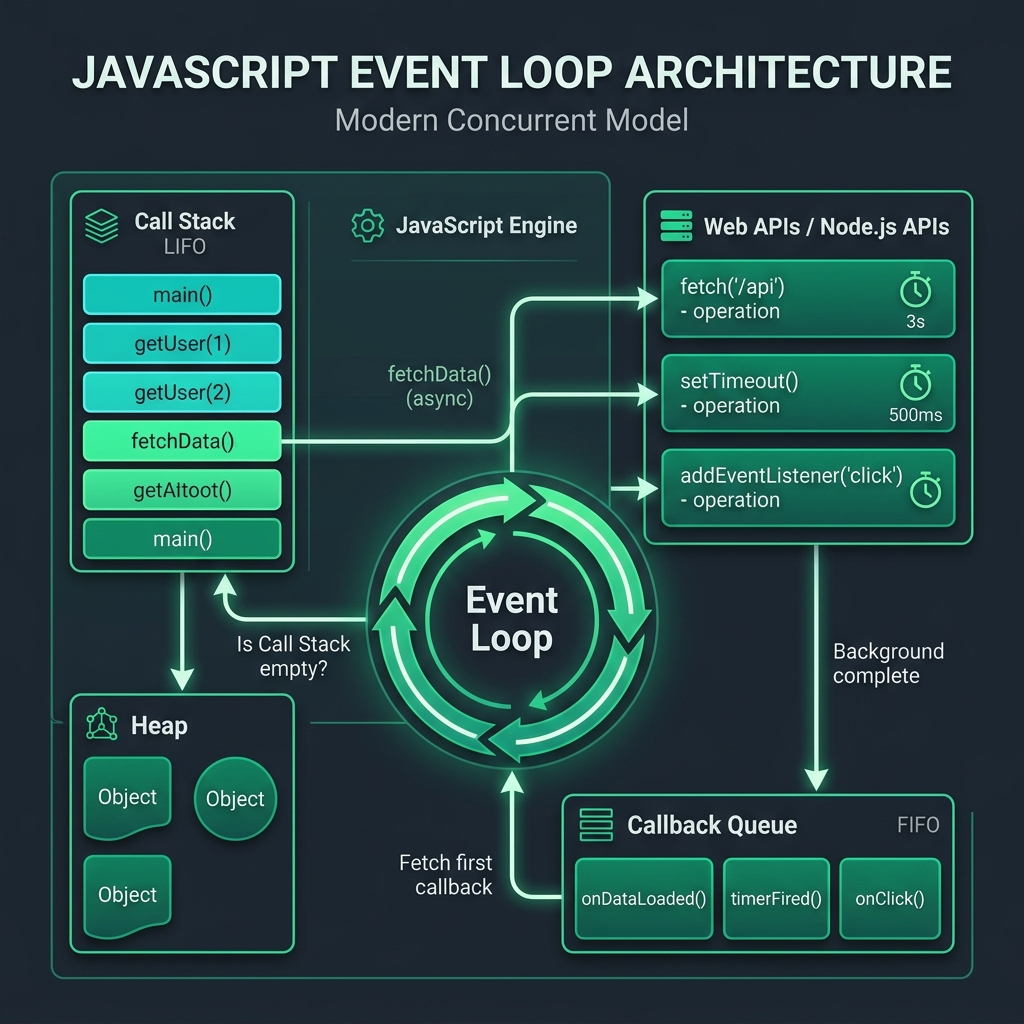
This question tests your understanding of the JavaScript Event Loop.
console.log('1')andconsole.log('4')are executed synchronously on the main thread.setTimeoutis a Web API that schedules a macrotask. Its callback is placed in the task queue after the timer (0ms) expires.Promise.thencreates a microtask. Microtasks are placed in a separate microtask queue.- After the main synchronous script executes, the event loop checks the microtask queue before moving on to the macrotask queue. Since the promise resolved immediately, its callback
console.log('3')runs. Finally, it executes the macrotaskconsole.log('2').
4. What is a Closure and what are its practical use cases?
Question: Explain closures and write a function that utilizes them to create a private counter.
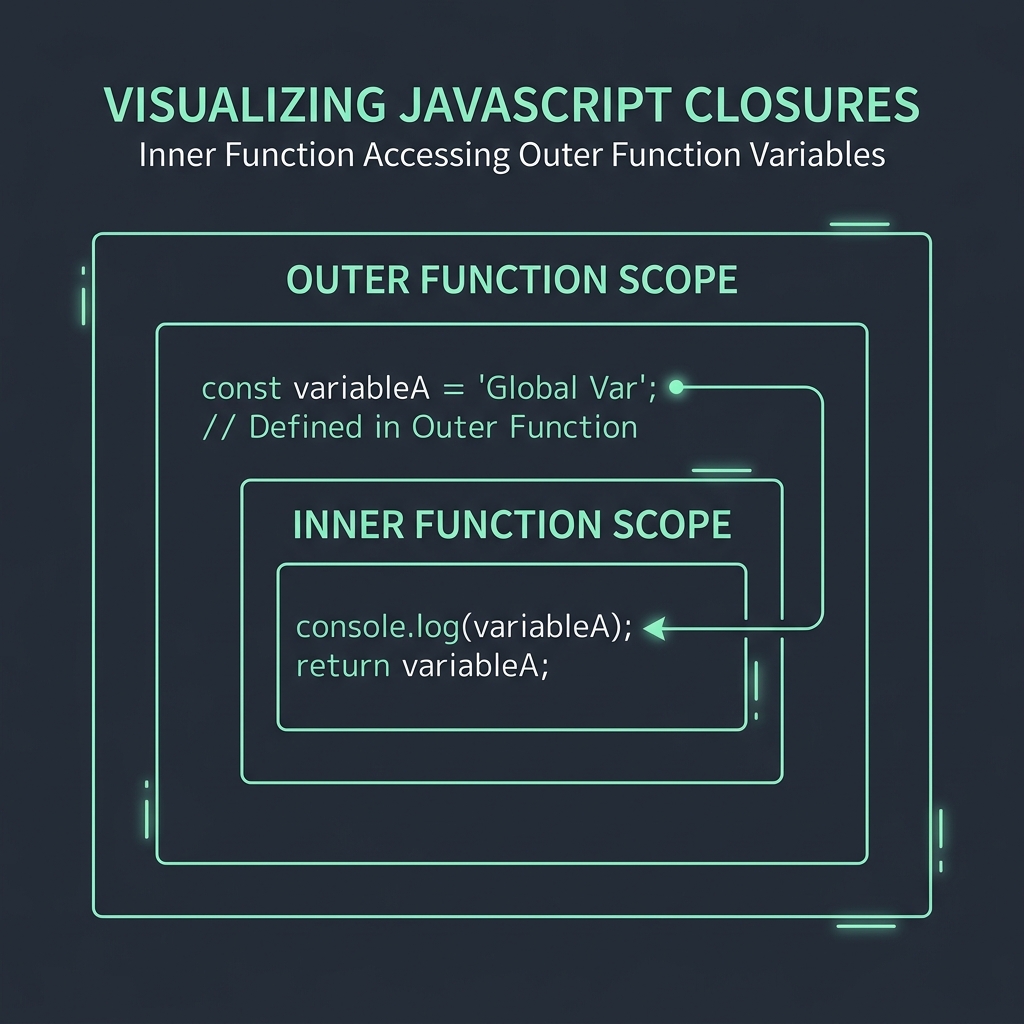
Answer: A closure is a feature in JavaScript where an inner function has access to the outer (enclosing) function's variables—a scope chain. The closure has three scope chains: it has access to its own scope, the outer function's variables, and global variables. Closures remember the environment in which they were created.
function createCounter() {
  let count = 0; // 'count' is a private variable
  return {
    increment: function() {
      count++;
      return count;
    },
    decrement: function() {
      count--;
      return count;
    }
  };
}

const counter = createCounter();
console.log(counter.increment()); // 1
console.log(counter.increment()); // 2
console.log(counter.count); // undefined (cannot be accessed directly)
5. How does JavaScript Type Coercion work with the + and - operators?
Question: What is the result of '5' + 3 and '5' - 3?
Answer:
'5' + 3outputs'53'(String).'5' - 3outputs2(Number).

When using the + operator, if one of the operands is a string, JavaScript prioritizes string concatenation. It converts the number 3 into the string '3', resulting in '53'.
However, the - operator is strictly for subtraction. Since you cannot subtract strings, JavaScript attempts to convert the string '5' into a number. The operation becomes 5 - 3, resulting in numerical 2.
6. What is the value of this in an arrow function?
Question: How does the this keyword behave differently in arrow functions compared to regular functions?
Answer: In regular functions, this is determined by how the function is invoked (the execution context). In arrow functions, this is lexically bound. This means an arrow function does not have its own this; it inherits this from the parent scope at the time it was defined. Arrow functions are particularly useful for callbacks and keeping the context of this intact within class methods.
7. What does Object.freeze() do, and how does it differ from const?
Question: Explain the difference between assigning an object to a const variable versus using Object.freeze(). Is Object.freeze() deep or shallow?
Answer:
constprevents variable reassignment. If you assign an object to aconstvariable, you cannot assign a completely new value to that variable identifier. However, you can still mutate the properties inside the object.Object.freeze()works on the object itself. It makes an object immutable, meaning you cannot add, remove, or change properties on the frozen object.
Note: Object.freeze() is shallow. If a property holds an object, that nested object can still be mutated unless you recursively freeze it.
8. What is Hoisting?
Question: What will the following code output?
console.log(a);
var a = 10;

console.log(b);
let b = 20;
Answer:
The first console.log(a) will output undefined. The second console.log(b) will throw a ReferenceError.
Hoisting is JavaScript's default behavior of moving declarations to the top of the current scope before code execution.
- Variables declared with
varare hoisted and initialized withundefined. - Variables declared with
letandconstare hoisted as well, but they are not initialized. They enter a "Temporal Dead Zone" (TDZ) from the start of the block until the declaration is evaluated. Accessing them in the TDZ throws aReferenceError.
9. How do you clone an object? (Shallow vs Deep Copy)
Question: What are the ways to clone an object, and what are the limitations to methods like Object.assign() and spread syntax?
Answer:
- Shallow Copy:
Object.assign({}, originalObj)or the spread operator{ ...originalObj }. These methods copy the properties, but if a property is a reference to a nested object, only the reference is copied. Changing the nested object in the clone will affect the original. - Deep Copy: Traditionally,
JSON.parse(JSON.stringify(originalObj))was used, but this drops functions,undefined, and Symbols, and cannot handle circular references. In modern JavaScript (or environments supporting it),structuredClone(originalObj)is the standard, built-in way to create a true deep clone, addressing the limitations of JSON parsing.
10. Can you explain the difference between call, apply, and bind?
Question: How do you explicitly set the value of this for a function?
Answer: All three methods change the context of this inside a function.
.call(thisArg, arg1, arg2): Invokes the function immediately. Arguments are passed individually..apply(thisArg, [argsArray]): Invokes the function immediately. Arguments are passed as an array..bind(thisArg, arg1, arg2): Returns a new function with thethiscontext bound permanently. It does not invoke the function immediately. You can execute it later.
11. What is the difference between map() and forEach()?
Question: When would you choose to use map() over forEach(), and vice versa?
Answer: Both are array methods used for iterating over elements.
map()returns a new array containing the results of calling the provided callback function on every element in the original array. It is chainable (e.g.,.map().filter()) and does not mutate the original array. Use it when you need to transform data.forEach()simply executes a provided function once for each array element. It returnsundefinedand is not chainable. Use it for executing side effects, like logging to the console or mutating external state.
12. Explain Event Bubbling and Event Capturing.
Question: In what order do nested DOM elements handle events, and how can you stop it?
Answer: They describe the two phases of event propagation in the DOM.
- Capturing Phase: The event goes down from the
Windowobject, through the DOM tree, to the target element. - Bubbling Phase: The event bubbles up from the target element, back through the DOM parents, to the
Windowobject.
By default, event listeners trigger in the bubbling phase. You can listen on the capturing phase by passing { capture: true } as the third argument to addEventListener. To stop an event from continuing to propagate, you call event.stopPropagation() within your event handler.
Conclusion
Understanding the underlying mechanics of JavaScript separates junior developers from seniors. Interviewers ask tricky questions not to catch you out, but to verify that you understand why the language behaves the way it does. Dive deep into these concepts, practice explaining them aloud, and you'll be well on your way to acing your next technical interview!