In modern cloud engineering and Site Reliability Engineering (SRE) interview loops, hiring panels rarely ask candidates to recite static CLI flags or explain trivial Docker commands. Instead, interviewers present high-stakes, ambiguous production outages: "It is 2:00 AM on a Friday, and three critical worker services in your production Kubernetes cluster are flapping between CrashLoopBackOff and Evicted. Alerts are firing across PagerDuty, ingress error rates have spiked to 14%, and our auto-scaling group is saturated. Walk us through your triage, root-cause isolation, and mitigation."
How you respond reveals whether you have managed distributed systems under actual operational pressure or merely memorized syntax. Novice engineers often conflate pod evictions with application crashes, blindly delete pods hoping the problem disappears, or waste critical incident response time inspecting application logs when the failure was caused by node-level kernel pressure.
Mastering kubernetes pod eviction crashloopbackoff troubleshooting requires an intimate understanding of the Linux container boundary, cgroup enforcement, kubelet eviction manager thresholds, Quality of Service (QoS) classes, and system probe lifecycles. This guide provides a production-grade diagnostic playbook and interview framework to help you diagnose, articulate, and resolve these failures under technical scrutiny.

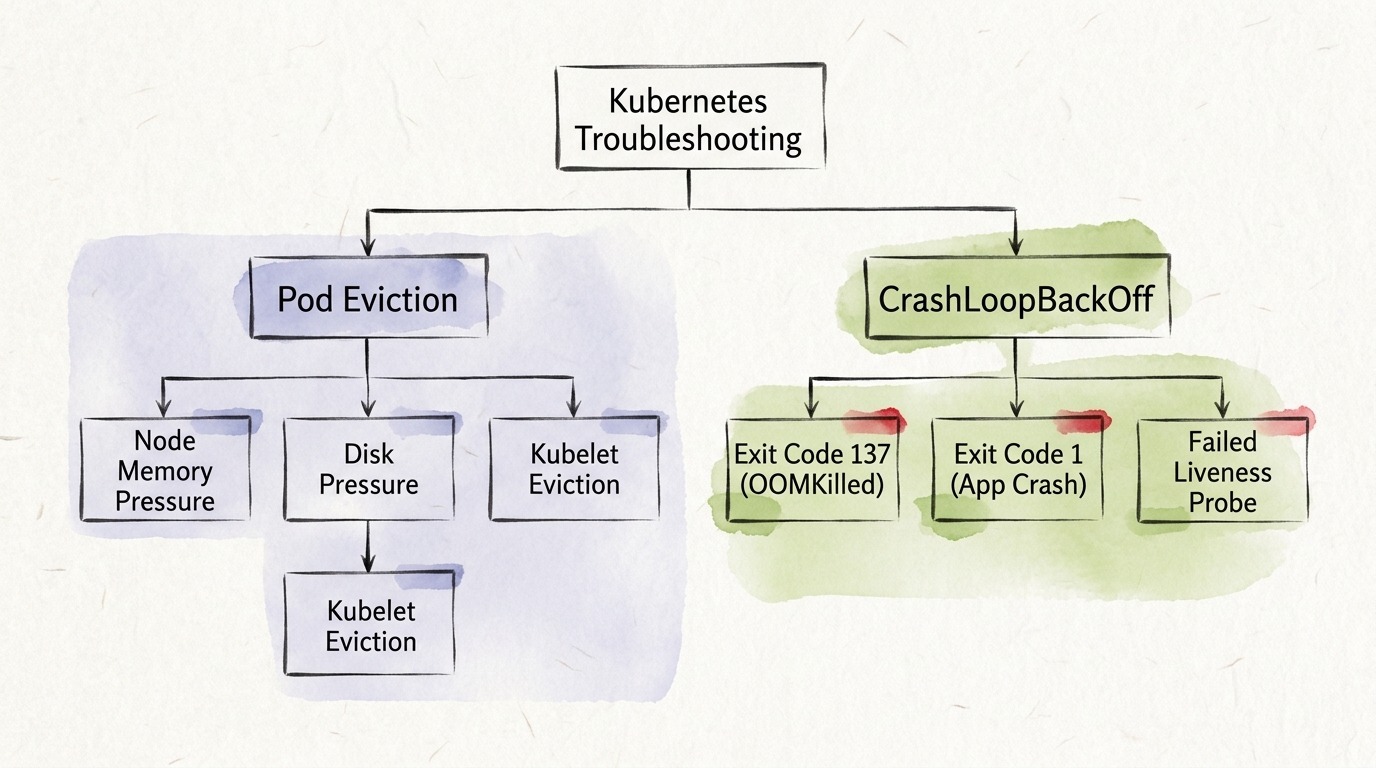
Pod Eviction vs. CrashLoopBackOff: The Architectural Divide
To construct a credible interview answer, you must immediately distinguish between container-level process failures and node-level resource reclamation. While both failure modes prevent your application from serving production traffic, their control planes, triggers, and remediation paths are fundamentally different.
A CrashLoopBackOff indicates that a container inside a kubernetes pod repeatedly starts, fails, and terminates, prompting the kubelet to restart it with an exponentially increasing delay. The pod remains scheduled on its host node, its phase remains Running (with container state set to Waiting), and the failure is almost exclusively tied to application-level errors, misconfigurations, or container-specific cgroup memory limit enforcement.
Conversely, a Pod Eviction is an administrative termination executed by the kubelet or the cluster autoscaler when the underlying physical worker node runs out of compute resources (such as memory, disk space, or process IDs) or when a node is marked for maintenance (tainting or draining). The kubelet deliberately kills one or more pods to preserve the stability of the operating system and critical system daemons (kubelet, containerd, systemd).
Architectural Comparison Matrix
The table below outlines the core differences interviewers expect senior engineers to articulate effortlessly:
| Architectural Dimension | Pod Eviction | CrashLoopBackOff |
|---|---|---|
| Executing Controller | Kubelet Eviction Manager or API Eviction Subresource | Kubelet Container Manager via CRI runtime (containerd/CRI-O) |
| Lifecycle Phase | Pod phase transitions to Failed (reason: Evicted) | Pod phase remains Running (container state: Waiting) |
| Trigger Mechanism | Node-level resource pressure (MemoryPressure, DiskPressure, PIDPressure) | Application process termination, unhandled exceptions, failed probes, OOM limits |
| Host Node Affinity | Pod is terminated on the node; controller schedules replacement on another node | Pod remains pinned to the same worker node across restart attempts |
| Exit Codes & Status | Terminated with reason Evicted and eviction condition message | Exit Code 137 (OOMKilled), Exit Code 1 (Fatal Error), Exit Code 143 (SIGTERM) |
| Restart Mechanism | Pod is never restarted in place; ReplicaSet/Deployment controller launches a new pod | Kubelet restarts container using exponential backoff (10s, 20s, 40s... up to 300s) |
| Immediate Triage Command | kubectl describe node <node-name> & kubectl get events | kubectl logs <pod-name> --previous & kubectl describe pod <pod-name> |
Deep Dive: Demystifying CrashLoopBackOff
When a container crashes upon startup or exits unexpectedly, the kubelet enforces a restart policy defined in the pod specification (which defaults to Always). To prevent a failing container from monopolizing host CPU cycles and flooding system logs, the kubelet injects an exponential backoff delay before each successive restart attempt.
The backoff sequence begins with an immediate restart, followed by delays of 10 seconds, 20 seconds, 40 seconds, 80 seconds, 160 seconds, and eventually caps at 300 seconds (5 minutes). Once a container runs successfully for ten consecutive minutes, the kubelet resets the backoff timer.
Understanding the specific root causes of a CrashLoopBackOff requires interpreting Linux exit codes and container lifecycle hooks.
1. Exit Code 137 (OOMKilled): Container Cgroup Memory Breaches
Exit Code 137 is among the most frequent failure modes encountered during Site Reliability Engineer (SRE) interview questions. The number 137 is derived from the standard Unix termination formula: 128 plus 9, where 9 represents the uncatchable SIGKILL signal sent by the Linux kernel Out-Of-Memory (OOM) Killer.
When a container exceeds the hard memory threshold configured under resources.limits.memory in its kubernetes deployment manifest, the Linux kernel cgroup controller immediately terminates the offending process. Inspecting the pod via kubectl describe pod reveals a distinct signature:
Containers:
  payment-processor:
    Container ID:   containerd://7b5a19c4d9...
    Image:          internal-registry.company.com/payment:v2.4.1
    State:          Waiting
      Reason:       CrashLoopBackOff
    Last State:     Terminated
      Reason:       OOMKilled
      Exit Code:    137
      Started:      Fri, 30 Oct 2026 01:45:10 +0000
      Finished:     Fri, 30 Oct 2026 01:45:18 +0000
    Ready:          False
    Restart Count:  5
    Limits:
      cpu:     1000m
      memory:  512Mi
    Requests:
      cpu:     250m
      memory:  256Mi
Critical Interview Distinction: Container OOM vs. Node OOM
In technical interviews, strong candidates clearly differentiate between a Container OOM and a Node OOM:
- In a Container OOM, the container breaches its individual cgroup limit (
512Miin the example above), even if the underlying worker node has 64 GB of free physical memory. The kernel terminates only that specific container, triggering a restart and resulting in a CrashLoopBackOff. - In a Node OOM, the physical machine exhausts its available RAM. The Linux kernel evaluates the
oom_scoreof every process running on the host and terminates the process with the highest score, often knocking out innocent background jobs or triggering a kubelet eviction condition.
2. Misconfigured Health Probes: Liveness vs. Startup Probes
Another primary driver of CrashLoopBackOff incidents is the misuse of Kubernetes health probes. A liveness probe is designed to detect deadlocks where an application is running but incapable of making progress. If a liveness probe fails consecutively for the configured failureThreshold, the kubelet kills the container and initiates a restart.
A catastrophic anti-pattern occurs when teams configure aggressive liveness probes on microservices that require extended initialization times (such as running database migrations, warming distributed caches, or compiling JIT runtimes):
# CATASTROPHIC CONFIGURATION: Flapping CrashLoopBackOff
livenessProbe:
  httpGet:
    path: /healthz
    port: 8080
  initialDelaySeconds: 5   # Microservice takes 25 seconds to connect to Postgres!
  periodSeconds: 5
  failureThreshold: 3
In this scenario, the microservice needs 25 seconds to establish its database connection pool. Because the liveness probe begins firing after 5 seconds and fails three consecutive times at 5-second intervals (totaling 20 seconds), the kubelet kills the container at second 20—5 seconds before it could ever become healthy. The container enters an infinite restart loop and enters CrashLoopBackOff.
The Production Solution: Always utilize a dedicated startupProbe alongside the livenessProbe. The startup probe disables liveness and readiness checks until the application has fully initialized:
# RESILIENT PRODUCTION CONFIGURATION
startupProbe:
  httpGet:
    path: /healthz
    port: 8080
  failureThreshold: 30
  periodSeconds: 10        # Permits up to 300 seconds for slow cold starts
livenessProbe:
  httpGet:
    path: /healthz
    port: 8080
  periodSeconds: 10
  failureThreshold: 3
  timeoutSeconds: 2
3. Application Panics and Configuration Drift
When a container terminates with Exit Code 1 (Application Error) or Exit Code 127 / 128 (Command Not Found / File Permission Denied), the issue is environmental or programmatic rather than infrastructural:
- Missing Secrets or ConfigMaps: The container attempts to read a mandatory environment variable injected from a
SecretKeyRefthat does not exist in the namespace. The container runtime fails before entrypoint execution. - Unchecked Runtime Exceptions: Unhandled database connection drops or unparsed command-line arguments cause the application to panic immediately upon bootstrapping.
- Triage Command: Interviewers want to hear you run
kubectl logs <pod-name> --previous. The--previousflag captures the stdout/stderr stream from the crashed container instance before the current restart wiped the buffer.
Deep Dive: Pod Eviction Mechanics and QoS Classes
While CrashLoopBackOff is driven by internal container conditions, Pod Eviction is an external intervention governed by the kubelet's resource thresholds.
The kubelet continuously monitors node-level resources: memory, filesystem disk space, and inode consumption. When physical resources drop below pre-established safety limits, the kubelet sets a condition on the node (such as MemoryPressure or DiskPressure) and rejects new pods. If usage remains above the threshold, the kubelet initiates eviction to prevent kernel deadlocks.
Soft vs. Hard Eviction Thresholds
- Hard Eviction Thresholds: The kubelet terminates pods immediately with zero grace period. Standard Kubernetes defaults include:
memory.available < 100Minodefs.available < 10%imagefs.available < 15%
- Soft Eviction Thresholds: The kubelet pairs a resource threshold with an operator-defined grace period (e.g.,
memory.available < 500Mifor2m). If the pressure condition persists beyond the grace period, pods are terminated following their standardterminationGracePeriodSeconds.
Kubelet Eviction Priority: The Quality of Service (QoS) Hierarchy
When the kubelet decides which pod to evict during a resource crunch, it does not pick randomly. It strictly enforces the Kubernetes Quality of Service (QoS) hierarchy. Demonstrating fluency with QoS classes is one of the highest-scoring signals in DevOps engineering interview questions.
Every pod is automatically assigned one of three QoS classes based on its resource requests and limits:
flowchart TD
    NodePressure["Node Resource Pressure (Memory / Disk)"] --> EvictCheck{"Which Pod to Evict First?"}
    EvictCheck -->|Priority 1| BestEffort["1. BestEffort Pods (No requests, no limits)"]
    EvictCheck -->|Priority 2| Burstable["2. Burstable Pods (Usage exceeds requests)"]
    EvictCheck -->|Priority 3| Guaranteed["3. Guaranteed Pods (Requests == Limits)"]
    style BestEffort fill:#f87171,stroke:#b91c1c,stroke-width:2px,color:#000
    style Burstable fill:#facc15,stroke:#ca8a04,stroke-width:2px,color:#000
    style Guaranteed fill:#4ade80,stroke:#16a34a,stroke-width:2px,color:#000
- BestEffort (Evicted First):
- Criteria: Neither
requestsnorlimitsare specified for any container in the pod. - Scheduling Behavior: These pods run on spare node capacity. The Linux kernel assigns them an
oom_score_adjof1000. During memory pressure, BestEffort pods are the first to be killed and evicted.
- Criteria: Neither
- Burstable (Evicted Second):
- Criteria: Containers specify
requeststhat are strictly less than theirlimits, or onlyrequestsare defined without limits. - Scheduling Behavior: Burstable pods are permitted to burst into shared node memory. If a node faces pressure, the kubelet ranks Burstable pods by how much their actual memory usage exceeds their configured
requests. The most egregious over-consumers are evicted first.
- Criteria: Containers specify
- Guaranteed (Evicted Last):
- Criteria: Every container in the pod must have both
requestsandlimitsexplicitly declared, and their values must be identical (requests.cpu == limits.cpuandrequests.memory == limits.memory). - Scheduling Behavior: Guaranteed pods receive an
oom_score_adjof-997. The kubelet will never evict a Guaranteed pod unless all BestEffort and Burstable pods on the node have already been eliminated, and system daemons still require resources.
- Criteria: Every container in the pod must have both
Ephemeral Storage Evictions: The Hidden Disk Trap
A frequent real-world production incident occurs when pods are evicted due to DiskPressure:
Events:
  Type     Reason     Age   From     Message
  ----     ------     ----  ----     -------
  Warning  Evicted    3m    kubelet  The node was low on resource: ephemeral-storage.
                                     Container payment-worker was using 14820Mi,
                                     which exceeds its request of 2000Mi.
Pods write unrotated application logs to stdout/stderr, unpack large tarballs into container writable layers, or mount unbounded emptyDir volumes for temporary scratch space. When these files fill the host root filesystem (/var/lib/kubelet), the kubelet evicts the offending pod. Candidates who explain how to configure resources.limits.ephemeral-storage demonstrate immediate senior-level infrastructure ownership.
The 4-Step SRE Incident Response Framework for Interviews
When interviewers challenge you with a multi-pod cluster failure, follow this structured, four-phase incident response framework. It demonstrates systematic problem-solving rather than erratic firefighting.
flowchart LR
    Phase1["1. Triage & Blast Radius"] --> Phase2["2. Isolation & Telemetry"]
    Phase2 --> Phase3["3. Rapid Mitigation"]
    Phase3 --> Phase4["4. Hardening & Prevention"]
    style Phase1 fill:#e0f2fe,stroke:#0284c7,stroke-width:2px
    style Phase2 fill:#f0fdf4,stroke:#16a34a,stroke-width:2px
    style Phase3 fill:#fef3c7,stroke:#d97706,stroke-width:2px
    style Phase4 fill:#f3e8ff,stroke:#9333ea,stroke-width:2px
Phase 1: Triage and Blast Radius Assessment
- Quantify User Impact: Check external latency, 5xx HTTP error rates, and queue consumer backlogs before diving into CLI commands.
- Determine Cluster Scope: Is this failure isolated to a single microservice, a single worker node, an entire Availability Zone (AZ), or a specific customer tenant?
# Check pod states across the affected namespace
kubectl get pods -n production -o wide --sort-by=.status.phase
Phase 2: Signal Isolation and Telemetry Extraction
- If Pods are in CrashLoopBackOff:
# 1. Inspect exit codes, termination reasons, and restart counts kubectl describe pod <pod-name> -n production # 2. Extract crash logs from the previous failed container execution kubectl logs <pod-name> -n production -c <container-name> --previous --tail=100 - If Pods are Evicted:
# 1. Inspect cluster events for node pressure triggers
kubectl get events -n production --field-selector reason=Evicted

# 2. Inspect node conditions and allocatable capacity
kubectl describe node <node-name> | grep -A 8 "Conditions:"
Phase 3: Rapid Production Mitigation (Stop the Bleeding)
Senior engineers prioritize restoring customer traffic over conducting forensic debugging on live nodes:
- If Node Pressure Eviction: Cordon and drain the impacted node (
kubectl cordon <node>andkubectl drain <node> --ignore-daemonsets) to push healthy pods onto fresh nodes managed by the cluster autoscaler. - If CrashLoopBackOff due to Bad Deployment: Roll back immediately to the previous known good release:
kubectl rollout undo deployment/<service-name> -n production - If Memory Limit Starvation: Increase the deployment memory limits or temporarily scale out horizontal replicas to distribute request load while developers investigate memory leak profiles.
Phase 4: Long-Term Hardening and Systemic Prevention
Explain to the interviewer how you would ensure this failure never happens again:
- Vertical Pod Autoscaler (VPA) & Goldilocks: Implement VPA in
Recommendationmode to continuously rightsize CPU and memory requests against real-world traffic patterns. - Enforce Namespace Quotas and LimitRanges: Prevent developers from deploying BestEffort pods without resource limits, ensuring every container participates predictably in QoS calculations.
- PodDisruptionBudgets (PDB): Ensure mission-critical workloads maintain minimum available replicas during voluntary evictions, node upgrades, or cluster drains.
Senior vs. Staff Interview Evaluation Rubric
Hiring committees evaluate responses against strict behavioral and technical benchmarks. The table below illustrates how interviewers distinguish junior candidates from senior and staff engineers:
| Evaluation Criteria | Junior Candidate Signal | Senior Candidate Signal | Staff / Principal SRE Signal |
|---|---|---|---|
| Problem Formulation | Assumes the application code has a bug; immediately opens logs without checking infrastructure context. | Distinguishes container vs. node boundaries; checks exit codes (137 vs 1) and node condition flags. | Evaluates blast radius, traffic metrics, cascading failure risks, and upstream circuit breakers. |
| QoS Fluency | Unaware of QoS classes or how Kubernetes calculates eviction ordering. | Explains BestEffort, Burstable, and Guaranteed tiers and references oom_score_adj values. | Designs cluster-wide resource governance, Admission Controllers, and LimitRanges to automate QoS compliance. |
| Mitigation Instinct | Restarts or deletes pods repeatedly in an attempt to clear error states. | Performs rollbacks, cordons failing nodes, or adjusts cgroup limits to stabilize customer uptime first. | Coordinates incident communication, implements traffic shedding, and designs systemic self-healing architecture. |
| Post-Incident Action | Files a bug ticket to increase container memory limits arbitrarily. | Implements memory profiling, configures startup probes, and adds alerting on pod restart velocity. | Establishes cluster-wide overcommit ratios, capacity planning frameworks, and architectural review standards. |
Architectural Context and Cross-Disciplinary Prep
Mastering Kubernetes incident recovery connects directly to broader distributed systems design. Container restarts and eviction cascades frequently emerge from upstream queue backlogs, database connection bottlenecks, or unthrottled consumer workloads. To build well-rounded technical mastery across your engineering interview loops, explore these foundational guides:
- Core Technical Preparation: Review our complete guide to technical interview prep to structure your multi-week interview roadmap.
- Containerization Fundamentals: Explore docker and kubernetes interview questions for foundational container networking and volume patterns.
- Reliability Engineering: Read our deep dive on Site Reliability Engineer (SRE) interview questions covering error budgets and SLA management.
- System Architecture: Understand how microservice message queues handle backpressure in our system design interview guide.
Practice Live Incident Troubleshooting Scenarios
Explaining Kubernetes failure mechanics under the pressure of a live interview requires active verbal practice, not passive reading. When an interviewer asks how you would handle an escalating CrashLoopBackOff crisis, your delivery must be calm, structured, and authoritative.
Test your incident response reflexes with our free 60-Second Job Blitz to evaluate your situational triage skills across real-world infrastructure scenarios with zero login required.
When you are ready for comprehensive, voice-driven mock interviews that simulate high-pressure SRE on-call scenarios, explore our totop.app pricing plans. Our AI-powered mock interviewers challenge your architectural decisions, provide instant Socratic feedback on your technical reasoning, and help you land top-tier infrastructure engineering roles.
Practice DevOps Specialist Questions Live with AI Mock Interviews
Turn any job description across Engineering, DevOps, Data, Marketing, Sales, Finance, or HR into a personalized test and live voice or text AI mock interview on totop.app, or test your speed right now in the 60-Second DevOps Specialist Blitz.
Play 60s DevOps Specialist Blitz (Free, No Login) | Start 14-Day Free Trial | Browse All Interview Guides