Git Interview Questions (You'll Actually Be Asked)
I still remember my very first technical interview. I had crammed every obscure data structure algorithm I could find. I was ready to reverse a linked list blindfolded. Then, the interviewer looked at my resume, smiled, and asked, "So, how do you handle a messy merge conflict when three developers are working on the same file?"
My mind went blank. I had spent so much time on theory that I completely overlooked the daily tools of the trade.
Git is the backbone of modern software development. Whether you're a junior dev pushing your first commit or a senior engineer orchestrating massive releases, version control is the water we swim in. Interviewers know this. They don’t just want to know if you can recite commands; they want to know if you can collaborate without accidentally deleting the production branch.
If you’re preparing for a frontend, backend, or full-stack role, you will be asked about Git. Let’s dive into the Git interview questions you’ll actually encounter, moving from the basics to the complex scenarios that test your real-world experience.
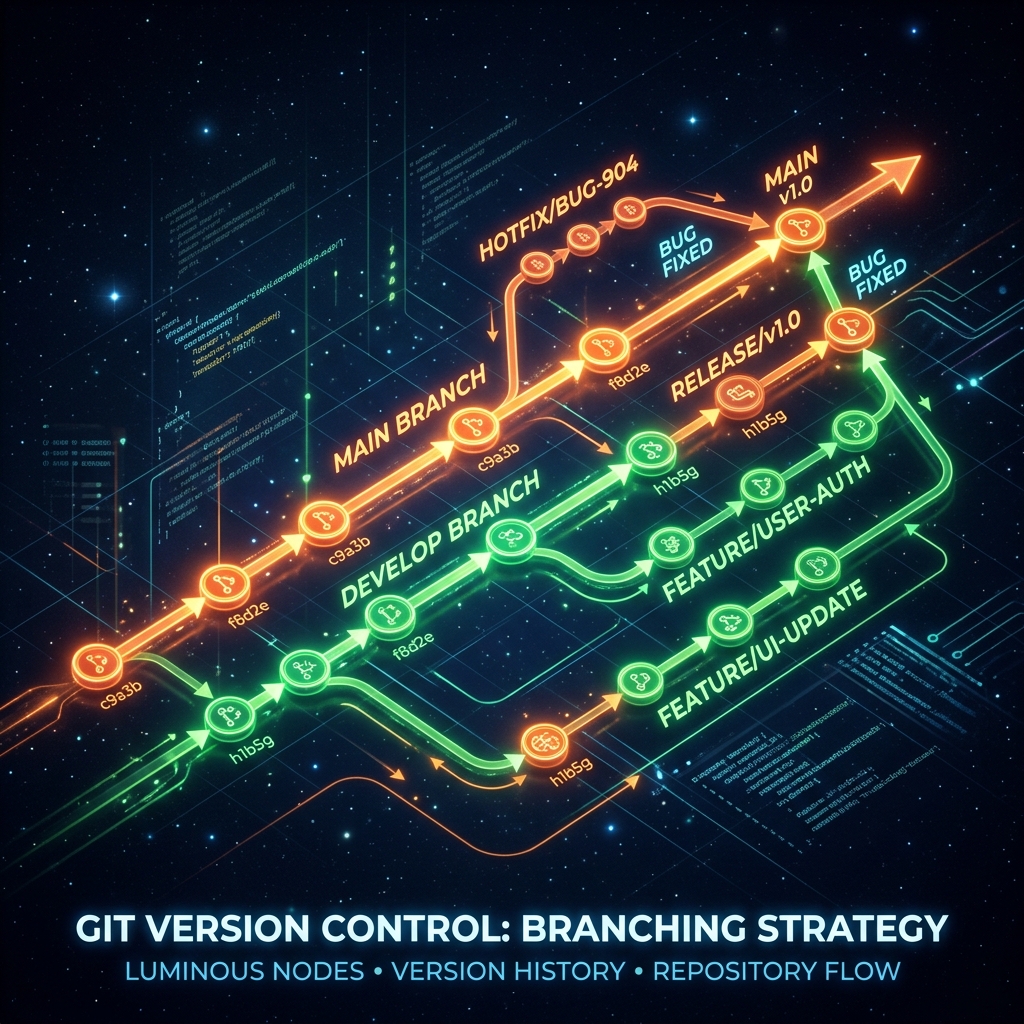
The "Warm-Up" Questions
These are the table stakes. If you stumble here, it might be a short interview. But don't just give dictionary definitions—explain why these concepts matter.
1. "Explain the difference between Git and GitHub."
This sounds basic, but you'd be surprised how many candidates conflate the two.
How to answer: Keep it clear and distinct. Git is the underlying version control software that runs locally on your machine. It tracks the history of changes. GitHub (or GitLab, or Bitbucket) is a cloud-based hosting service that manages Git repositories.
The Human Touch: "I like to think of Git as the camera capturing the photos, and GitHub as the Instagram feed where you share them with the team."
2. "What exactly is a commit?"
How to answer: A commit is a snapshot of your repository at a specific point in time. It records the changes made to the files, along with metadata like the author, timestamp, and a commit message.
Pro-tip: Mention the importance of atomic commits. Interviewers love it when you talk about making small, logical commits with descriptive messages rather than a massive "fixed stuff" end-of-day dump.
3. "Describe the Git workflow: working directory, staging area, and repository."
How to answer: This is about understanding the lifecycle of a file in Git.
- Working Directory: Where you actively edit files. These changes are untracked or modified.
- Staging Area (Index): Where you prepare changes for the next commit using
git add. It lets you group related changes together. - Local Repository: Where changes are permanently saved as a snapshot using
git commit.
The "Day-to-Day Realities" Questions
Here is where the interview starts getting into the weeds of actual development work. They want to see how you handle common roadblocks.
4. "You've just realized your last commit message has a typo, and you forgot to include a crucial file. How do you fix it?"
How to answer: The magic command here is git commit --amend.
Explain that you would first stage the forgotten file (git add missing_file.txt). Then, run git commit --amend. This opens your default text editor, allowing you to fix the typo in the message and combine the new staged file into the previous commit.
Caveat: Always add that you should only do this if you haven't pushed the commit to a shared remote branch yet. Rewriting shared history is a recipe for angry teammates.

5. "Walk me through how you resolve a merge conflict."
Ah, the dreaded merge conflict. This is a guarantee in any collaborative environment.
How to answer: Don't panic. Walk through it methodically:
- Git will pause the merge and mark the conflicting files.
- I open the files and look for the conflict markers (
<<<<<<<,=======,>>>>>>>). - I assess both versions of the code (the current branch and the incoming branch). Sometimes I keep mine, sometimes theirs, and often, I have to manually combine the logic.
- Once resolved, I remove the markers, save the file.
- Finally, I run
git addon the resolved files andgit committo finalize the merge.
The Human Touch: Share a quick story about a tricky conflict you solved. "I once had a nasty conflict in a massive CSS file. Instead of guessing, I jumped on a quick call with the other developer. Communication is usually the best conflict resolution tool."
6. "What is a detached HEAD state, and how do you get out of it?"
How to answer: HEAD is just a pointer to the current snapshot you're looking at. Usually, it points to a branch name (like main). A "detached HEAD" happens when you check out a specific commit hash instead of a branch. You're essentially looking at the past without a branch to hold onto any new changes you make.
To get out of it, you simply check out an existing branch (e.g., git checkout main). If you made changes while detached and want to keep them, you need to create a new branch from that state (git checkout -b new-branch-name).
The "Senior Level" Concepts
If you are aiming for a mid-to-senior role, the interviewer wants to know how you manage repository history and collaborate at scale.
7. "Git Merge vs. Git Rebase. When would you use which?"
This is arguably the most common advanced Git question. You need to understand the implications of both.
How to answer:
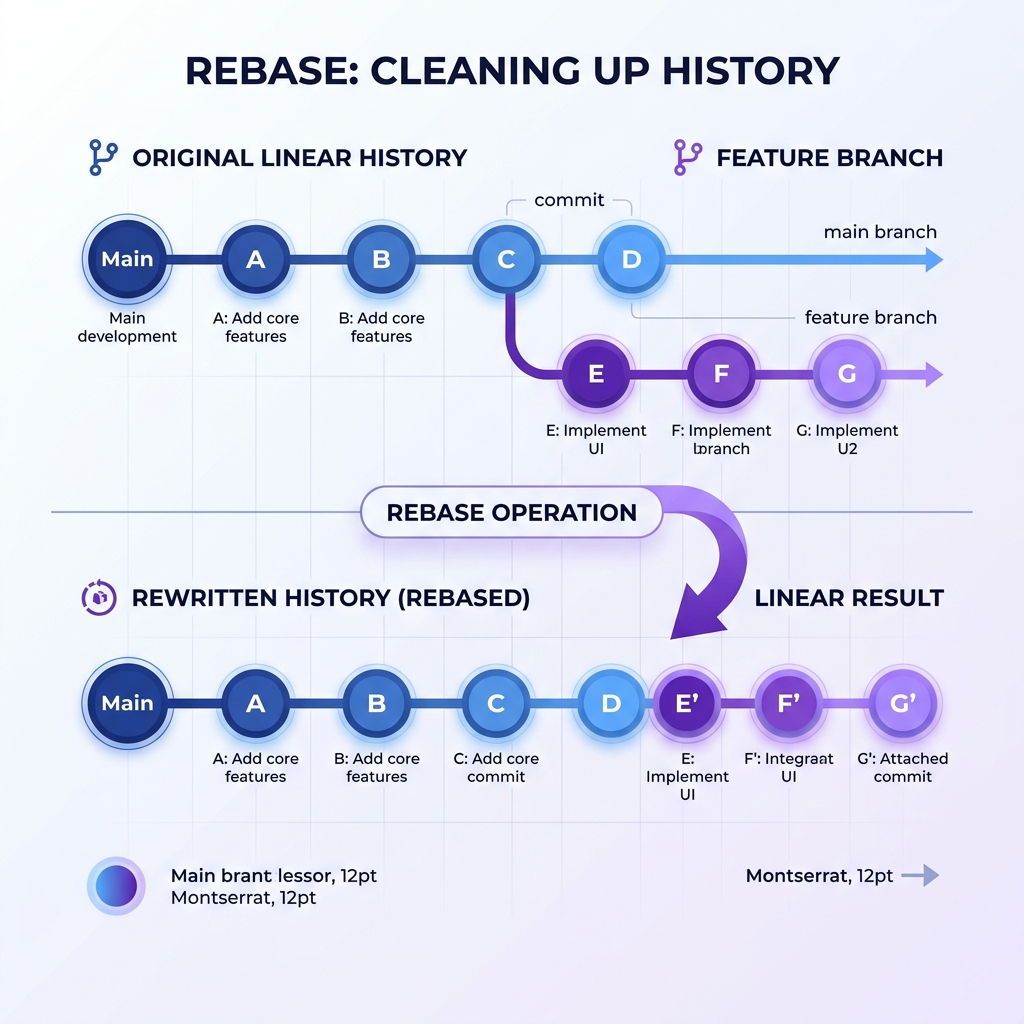
- Merge: Takes the contents of a source branch and integrates it with a target branch. It preserves the exact history of both branches and creates a new "merge commit." It's safe, non-destructive, but can lead to a messy, web-like history if used heavily.
- Rebase: Takes your feature branch and "replays" its commits on top of the tip of the target branch (like
main). It rewrites the project history to create a perfectly linear, clean timeline.
When to use which: Use merge for incorporating finished features into a shared main branch, where preserving the historical context is valuable. Use rebase to update your local, private feature branch with the latest changes from main before you open a Pull Request.
The Golden Rule: Never rebase commits that exist outside your repository and that people may have based work on.
8. "How do you find exactly which commit introduced a bug?"
How to answer: git bisect. It is a lifesaver.
Explain that git bisect uses a binary search algorithm to find the exact commit that introduced an issue. You tell Git a "bad" commit (where the bug exists) and a "good" commit (where the bug wasn't present). Git will check out a commit halfway between them. You test the code and tell Git if it's good or bad. It repeats this process, halving the search space each time, until it pinpoints the exact culprit.
9. "Explain git cherry-pick and when it's useful."
How to answer: git cherry-pick allows you to take a specific commit from one branch and apply it to another branch, without merging the entire branch.
Use case: Imagine a colleague fixed a critical security vulnerability on a development branch, but that branch isn't ready to be merged to main. You can use cherry-pick to pull just that hotfix commit into main immediately to deploy the patch.
Preparing for the Real Thing
Technical interviews are stressful, but mastering Git shouldn't be the hardest part of your prep. Remember that interviewers aren't usually looking for a human encyclopedia of Git commands. They want to see that you understand the underlying concepts—how Git tracks history, how branches work, and how you collaborate without causing chaos.
When practicing these answers, always try to tie them back to real experiences you've had. The difference between a good candidate and a great one is often the ability to say, "Here is the technical definition, and here is how I actually used it last month to fix a production issue."
If you're looking for more ways to sharpen your skills, platforms like totop.app are fantastic for running through mock interviews and getting feedback on how you articulate these technical concepts.
The next time an interviewer asks you about a messy merge conflict, you won't freeze. You'll smile, take a breath, and walk them through exactly how you'd handle it. Good luck!