In senior Cloud Platform, Site Reliability Engineering, and DevOps hiring loops, interviewers frequently challenge candidates with real-world infrastructure architecture dilemmas: "We manage four hundred microservices deployed across development, staging, and multi-region production clusters using Argo CD and GitHub Actions. Some teams want parameter-heavy Helm charts with nested conditionals, while others argue for template-free Kustomize overlays. How do you evaluate Helm versus Kustomize for enterprise deployments, what operational trade-offs dictate your choice, and how do you design a GitOps workflow that avoids configuration drift and deployment failures?"
Interview panels use this exact prompt to evaluate whether an engineer possesses hands-on operational scar tissue or merely recites documentation bullet points. Surface-level answers—such as "Helm is a package manager and Kustomize is built into kubectl"—signal junior intuition. Senior and staff engineers evaluate these tools through the lens of developer experience, blast-radius isolation, release state ownership, three-way merge mechanics, and disaster recovery.
Mastering the helm charts vs kustomize kubernetes deployment interview requires a thorough grasp of both tools' underlying execution models, concrete manifest architectures, and the hybrid patterns used by elite platform engineering teams.

Architectural Philosophy: Parameterized Templating vs. Pure Declarative Overlays
To construct an authoritative answer during a devops interview, candidates must first articulate the distinct philosophy and execution model powering each tool.
Helm: The Parameterized Packaging Engine
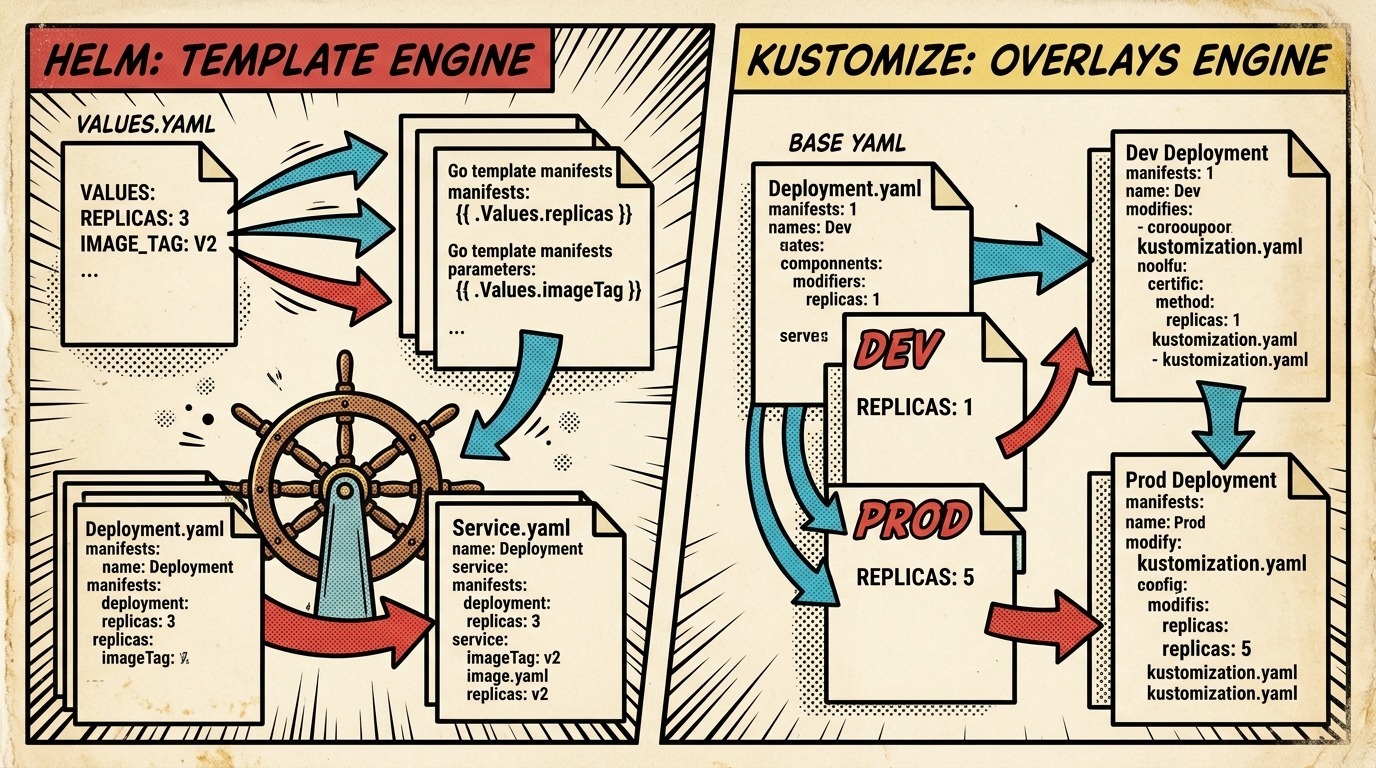
Helm models application delivery around the concept of a software package (a Chart). It relies on Go text templating (text/template) augmented with the Sprig template library to inject values into Kubernetes manifests at render time.
values.yaml  ──┐
Chart.yaml   ──┼──> [ Helm Template Engine ] ──> Rendered Manifests ──> Kubernetes API Server
templates/*.yaml ─┘                                     │
                                                        ▼
                                           Release Secret (In-Cluster State)
Key characteristics that interviewers expect candidates to highlight:
- Dynamic Variable Injection: Every attribute—from replica counts and container image tags to ingress hostnames and resource limits—can be parameterized via
values.yaml. - Release Tracking & In-Cluster State: Helm records deployment state directly in Kubernetes Secrets (
sh.helm.release.v1.<release-name>.v<revision>). This enables native rollback capabilities (helm rollback <release> <revision>) and lifecycle hooks (pre-install,post-upgrade,test). - Artifact Packaging & Versioning: Charts can be packaged into tarballs, signed with provenance keys, and distributed via OCI (Open Container Initiative) registries or Helm repositories like Artifact Hub.
- Dependency Management: A chart can declare sub-charts within
Chart.yaml, automatically resolving dependencies and scoping values across complex application topologies.
Kustomize: The Template-Free Declarative Customizer
Kustomize rejects string-interpolation templating entirely. Instead, it adheres to pure, valid Kubernetes YAML manifests, transforming resources via a declarative overlay engine using Kubernetes strategic merge patches and JSON 6902 patches.
base/ (Valid YAML) ──┐
                     ├──> [ Kustomize Engine (kubectl -k) ] ──> Target Manifests ──> Kubernetes API Server
overlays/prod/    ───┘      (Zero In-Cluster State)
(kustomization.yaml)
Key characteristics of Kustomize:
- No Template Language: All inputs and outputs are 100% valid Kubernetes YAML. Engineers do not spend time escaping brackets, debugging whitespace errors, or memorizing helper functions.
- Base and Overlays Architecture: A shared
base/directory defines canonical resource manifests. Environment directories (overlays/dev/,overlays/prod/) inherit from the base and declare minimal, targeted delta patches. - Stateless Client-Side Execution: Kustomize does not create release secrets or maintain state inside the target cluster. The Git commit history serves as the exclusive single source of truth.
- Native Kubectl Integration: Integrated directly into the Kubernetes CLI via
kubectl apply -k ./path, eliminating external client installation requirements.
Helm vs Kustomize: Technical Evaluation Matrix
When interviewers ask for a direct comparison, presenting a structured rubric instantly demonstrates architectural leadership. The table below summarizes the key trade-offs evaluated in technical rounds.
| Architectural Dimension | Helm (v3+) | Kustomize (v5+) | Staff-Level Interview Insight |
|---|---|---|---|
| Core Paradigm | Parameterized string templating (Go templates + Sprig) | Declarative structural overlays (Strategic Merge & JSON patches) | Helm generates YAML via string interpolation; Kustomize manipulates Kubernetes AST objects directly. |
| Release State Tracking | Stateful: stored in cluster Secret objects per revision | Stateless: 100% client-side; state resides entirely in Git | Helm enables helm rollback; Kustomize relies on git revert synchronized by a GitOps controller. |
| Manifest Validity | Raw template files are invalid YAML until rendered | Base and overlay manifests are valid Kubernetes YAML at all times | Kustomize manifests can be linted natively with schema checkers without pre-rendering pipelines. |
| Third-Party Distribution | Industry standard (OCI registries, versioned .tgz packages) | Git repositories, URLs, or submodules (No standard package index) | Helm dominates off-the-shelf platform tooling (e.g., Cert-Manager, Ingress-Nginx, Prometheus). |
| Configuration Sprawl | Parameter Explosion Antipattern: values.yaml grows to 2,000+ lines | Directory Duplication: Nested overlays can become difficult to trace across 20+ environments | Helm hides complexity behind template logic; Kustomize surfaces changes as explicit patch manifests. |
| Custom Resource Definitions (CRDs) | Limited CRD upgrade support (CRDs in crds/ are installed once, never upgraded) | Native resource treatment; CRDs are patched and upgraded like any core object | Helm deliberately refuses to modify CRDs during helm upgrade to prevent accidental cluster-wide data loss. |
| GitOps Integration | Requires Helm Controller (Flux) or Helm rendering plugin (Argo CD) | Native, frictionless integration with Argo CD and Flux Kustomize Controller | Argo CD can render both, but Kustomize diffs produce cleaner, human-readable Git pull request reviews. |
Production Walkthrough 1: Multi-Environment Deployment Architecture
To stand out in your comprehensive technical interview preparation guide review, walk the interviewer through concrete directory structures and manifest definitions for both tools.
Scenario: Deploying an API Service to Staging and Production
Consider a payment API service requiring 2 replicas in staging and 10 replicas with strict resource limits and pod anti-affinity in production.
Implementing with Helm
In Helm, the structure centers around template logic and environment-specific values files:
my-api-chart/
├── Chart.yaml
├── values.yaml              # Shared default values
├── values-staging.yaml      # Staging overrides
├── values-production.yaml   # Production overrides
└── templates/
    ├── deployment.yaml
    └── service.yaml
Inside templates/deployment.yaml:
apiVersion: apps/v1
kind: Deployment
metadata:
  name: {{ include "my-api.fullname" . }}
  labels:
    {{- include "my-api.labels" . | nindent 4 }}
spec:
  replicas: {{ .Values.replicaCount }}
  selector:
    matchLabels:
      {{- include "my-api.selectorLabels" . | nindent 6 }}
  template:
    metadata:
      labels:
        {{- include "my-api.selectorLabels" . | nindent 8 }}
    spec:
      containers:
        - name: {{ .Chart.Name }}
          image: "{{ .Values.image.repository }}:{{ .Values.image.tag | default .Chart.AppVersion }}"
          resources:
            {{- toYaml .Values.resources | nindent 12 }}
          {{- if .Values.affinity }}
          affinity:
            {{- toYaml .Values.affinity | nindent 12 }}
          {{- end }}
Inside values-production.yaml:
replicaCount: 10
resources:
  limits:
    cpu: "2000m"
    memory: "2Gi"
  requests:
    cpu: "500m"
    memory: "512Mi"
affinity:
  podAntiAffinity:
    requiredDuringSchedulingIgnoredDuringExecution:
      - labelSelector:
          matchExpressions:
            - key: app.kubernetes.io/name
              operator: In
              values: ["my-api"]
        topologyKey: "kubernetes.io/hostname"
Interview Discussion Point: Highlight the failure mode known as Parameter Explosion. When a team wants to add an obscure Kubernetes feature—such as a sidecar container, custom volume mount, or pod disruption budget—someone must first update the chart's template file to expose that parameter before any application team can use it. Over time, charts become brittle webs of nested if/else and toYaml directives that are notoriously difficult to test.
Implementing with Kustomize
In Kustomize, the structure separates immutable bases from environment-specific patches:
my-api/
├── base/
│   ├── deployment.yaml
│   ├── service.yaml
│   └── kustomization.yaml
└── overlays/
    ├── staging/
    │   ├── kustomization.yaml
    │   └── replica-patch.yaml
    └── production/
        ├── kustomization.yaml
        └── production-patch.yaml
Inside base/deployment.yaml (clean, unadulterated Kubernetes manifest):
apiVersion: apps/v1
kind: Deployment
metadata:
  name: payment-api
spec:
  replicas: 2
  template:
    spec:
      containers:
        - name: payment-api
          image: registry.internal/payment-api:v1.4.0
          resources:
            requests:
              cpu: 250m
              memory: 256Mi
Inside overlays/production/kustomization.yaml:
apiVersion: kustomize.config.k8s.io/v1beta1
kind: Kustomization

resources:
  - ../../base

namePrefix: prod-
namespace: payments

patches:
  - path: production-patch.yaml
    target:
      kind: Deployment
      name: payment-api

images:
  - name: registry.internal/payment-api
    newTag: v1.4.2
Inside overlays/production/production-patch.yaml:
apiVersion: apps/v1
kind: Deployment
metadata:
  name: payment-api
spec:
  replicas: 10
  template:
    spec:
      affinity:
        podAntiAffinity:
          requiredDuringSchedulingIgnoredDuringExecution:
            - labelSelector:
                matchExpressions:
                  - key: app
                    operator: In
                    values: ["payment-api"]
              topologyKey: "kubernetes.io/hostname"
      containers:
        - name: payment-api
          resources:
            limits:
              cpu: "2000m"
              memory: "2Gi"
            requests:
              cpu: "500m"
              memory: "512Mi"
Interview Discussion Point: Kustomize uses Strategic Merge Patching. Any field not defined in the patch is left untouched from the base manifest. Developers do not need to ask platform teams to "expose a parameter"—if the Kubernetes API supports the field, Kustomize supports it immediately out of the box.
Production Walkthrough 2: Failure Modes, Drift, and Incident Response
Hiring managers want to hear about how you respond under pressure when a production rollout fails. Connect your tool choice directly to production stability and incident response.
Scenario 1: A Misconfigured Helm Release Causes a CrashLoopBackOff
Suppose a continuous integration pipeline using github actions triggers helm upgrade --install my-service ./charts -f values-prod.yaml. A developer inadvertently passes an invalid database environment variable, causing every newly created kubernetes pod to enter a CrashLoopBackOff state.
The Helm Failure Dynamics
- Three-Way Strategic Merge Patching: Helm calculates a 3-way patch between the previous manifest, the newly rendered manifest, and the live cluster state.
- Release State Locking: If an engineer panics and terminates the pipeline midway, Helm may mark the release status as
pending-upgradeorfailed. Future Helm commands will fail with:
To resolve this in a live incident, an engineer must either manually patch or delete the underlying release Secret in the namespace (Error: UPGRADE FAILED: another operation (install/upgrade/rollback) is in progresskubectl delete secret -l owner=helm,name=my-service,status=pending-upgrade) or use the--atomicflag during invocation. - Rollback Mechanics: Running
helm rollback my-service 14applies the exact rendered manifest stored in revision 14's release Secret. However, if external configuration (like an ingress controller or database credential) changed outside of Helm, the rollback may still fail.
Scenario 2: The Kustomize GitOps Reconciliation Failure
Now consider the same incident managed by Argo CD with Kustomize overlays.
The Kustomize / GitOps Dynamics
- Zero Cluster Release Locks: Because Kustomize has no server-side release state, there are no locked secrets.
- Instant Rollback via Git: The platform engineer initiates an emergency rollback by opening a PR with
git revert <commit-sha>. Within seconds, Argo CD detects the Git head change and applies the known-good base and overlay. - Automated Drift Detection: If an engineer performed an emergency
kubectl edit deploymentdirectly during the outage, Argo CD flags the application asOutOfSync. The platform team can either trigger an automated sync to overwrite manual tampering or selectively reconcile differences.
For candidates preparing for deep triage scenarios, reviewing troubleshooting Kubernetes pod eviction and CrashLoopBackOff provides essential operational depth.
The Staff-Engineer Answer: The Hybrid "Post-Renderer" Pattern
When an interviewer asks: "If you were building our platform from scratch today, which tool would you mandate across our entire engineering organization?"—do not pick one dogmatically.
The industry-standard architectural best practice in 2026 is the Hybrid Helm + Kustomize Pipeline:
+-------------------------------------------------------+
| 3rd-Party Off-the-Shelf Tools                         |
| (Cert-Manager, Argo CD, Ingress-Nginx, Datadog)       |
|                                                       |
|   Helm Charts from Upstream OCI Registries            |
|   (Leverage vendor packaging and dependency upkeep)   |
+---------------------------+---------------------------+
                            |
                            | Output rendered YAML
                            v
+-------------------------------------------------------+
| Internal Enterprise Platform Standards                |
| (Security Policies, Istio Injections, NodeAffinity)   |
|                                                       |
|   Kustomize Post-Renderer Overlay                     |
|   (Inject corporate labels, securityContext, proxies) |
+---------------------------+---------------------------+
                            |
                            v
+-------------------------------------------------------+
| In-House Proprietary Microservices                    |
| (Go, Node.js, Python microservices)                   |
|                                                       |
|   Pure Kustomize Base + Environment Overlays          |
|   (Zero templating overhead, 100% valid YAML in Git)  |
+-------------------------------------------------------+
1. Helm for Third-Party Ecosystem Tools
Do not maintain custom vanilla YAML manifests for complex third-party tools like Cert-Manager, Ingress-Nginx, or Prometheus-Operator. These projects release versioned Helm charts maintained by hundreds of upstream contributors. Trying to fork and maintain raw YAML manifests creates massive maintenance toil.
2. Kustomize Post-Renderers for Enterprise Governance
When consuming upstream Helm charts, your security and compliance team may require organization-specific modifications—such as injecting an enterprise image pull secret, enforcing non-root securityContext policies, or adding custom Prometheus scrape annotations.
Instead of forking the upstream Helm chart, use Helm's native --post-renderer flag or Argo CD's Kustomize post-renderer plugin:
helm template ingress-nginx ingress-nginx/ingress-nginx \
  --namespace ingress-nginx \
  -f custom-values.yaml \
  --post-renderer ./kustomize-post-render.sh | kubectl apply -f -
Where kustomize-post-render.sh simply executes:
#!/bin/bash
cat <&0 > base/all.yaml
kustomize build .
This ensures upstream charts remain cleanly updateable while enterprise security guardrails are applied declaratively.
3. Pure Kustomize for Internal Microservices
For internal application services developed by your product engineering teams, mandate pure Kustomize. Developers write standard Kubernetes YAML, preview changes locally with kubectl kustomize, and inspect transparent diffs in pull requests without deciphering Go template escaping.
This architectural balance mirrors standard microservice design trade-offs, much like choosing between REST vs gRPC vs GraphQL architectural trade-offs in high-throughput distributed systems.
Interview Evaluation Rubric: Junior vs. Senior vs. Staff
Understanding how interviewers evaluate your response is critical. The rubric below outlines what hiring bars look for across different seniority levels:
| Seniority Level | Characteristics of the Answer | Common Interview Red Flags |
|---|---|---|
| Junior / Mid-Level | • Treats tools as mutually exclusive alternatives. • Mentions that Helm has values.yaml and Kustomize uses folders.• Focuses primarily on syntax and command-line execution ( helm install vs kubectl apply -k). | • Mentions Tiller (Tiller was completely removed in Helm v3 back in 2019). • Cannot explain how Helm tracks release state. • Unaware that Kustomize is natively embedded in kubectl. |
| Senior Engineer | • Compares parameter interpolation vs. structural AST patching. • Details multi-environment promotion strategies in GitOps pipelines. • Explains release failure recovery, release secret cleanup, and three-way strategic merge behavior. | • Cannot explain how to handle CRD lifecycle upgrades in Helm. • Recommends templating everything with Helm without acknowledging parameter explosion. • Ignores secret management and encryption at rest. |
| Staff / Principal | • Proposes the Hybrid Architecture: Helm for upstream ecosystem tools, Kustomize for in-house services and enterprise post-rendering. • Discusses developer cognitive load, PR review readability, and blast-radius containment. • Articulates CI/CD pipeline integration, automated drift remediation with Argo CD/Flux, and organizational scalability. | • Over-engineers solutions dogmatically without assessing team velocity. • Fails to connect tooling choices to business uptime and incident response SLAs. |
If you ever encounter an unexpected follow-up question during your panel, remember the strategies in our guide on how to handle questions gracefully when you do not know the answer.
Sharpen Your Platform Interview Skills with AI Mock Practice
Explaining complex Kubernetes deployment architectures under pressure requires more than reading technical documentation. You need live, rapid-fire verbal practice defending architectural trade-offs, answering sudden edge-case follow-ups, and structuring multi-cluster failure recovery strategies out loud.
On totop.app, you can run realistic, voice-interactive technical mock interviews calibrated specifically for DevOps, Cloud Architecture, and SRE roles. Practice navigating tough infrastructure scenarios, defending Helm versus Kustomize trade-offs, and receiving instant Socratic feedback on your depth, clarity, and seniority signals.
- Take the 60-Second Job Blitz to test your technical interview readiness across Kubernetes, cloud infrastructure, and distributed systems.
- Explore totop.app pricing to access unlimited AI mock interview sessions, custom job description question generation, and personalized evaluation rubrics.
Practice DevOps Specialist Questions Live with AI Mock Interviews
Turn any job description across Engineering, DevOps, Data, Marketing, Sales, Finance, or HR into a personalized test and live voice or text AI mock interview on totop.app, or test your speed right now in the 60-Second DevOps Specialist Blitz.
Play 60s DevOps Specialist Blitz (Free, No Login) | Start 14-Day Free Trial | Browse All Interview Guides