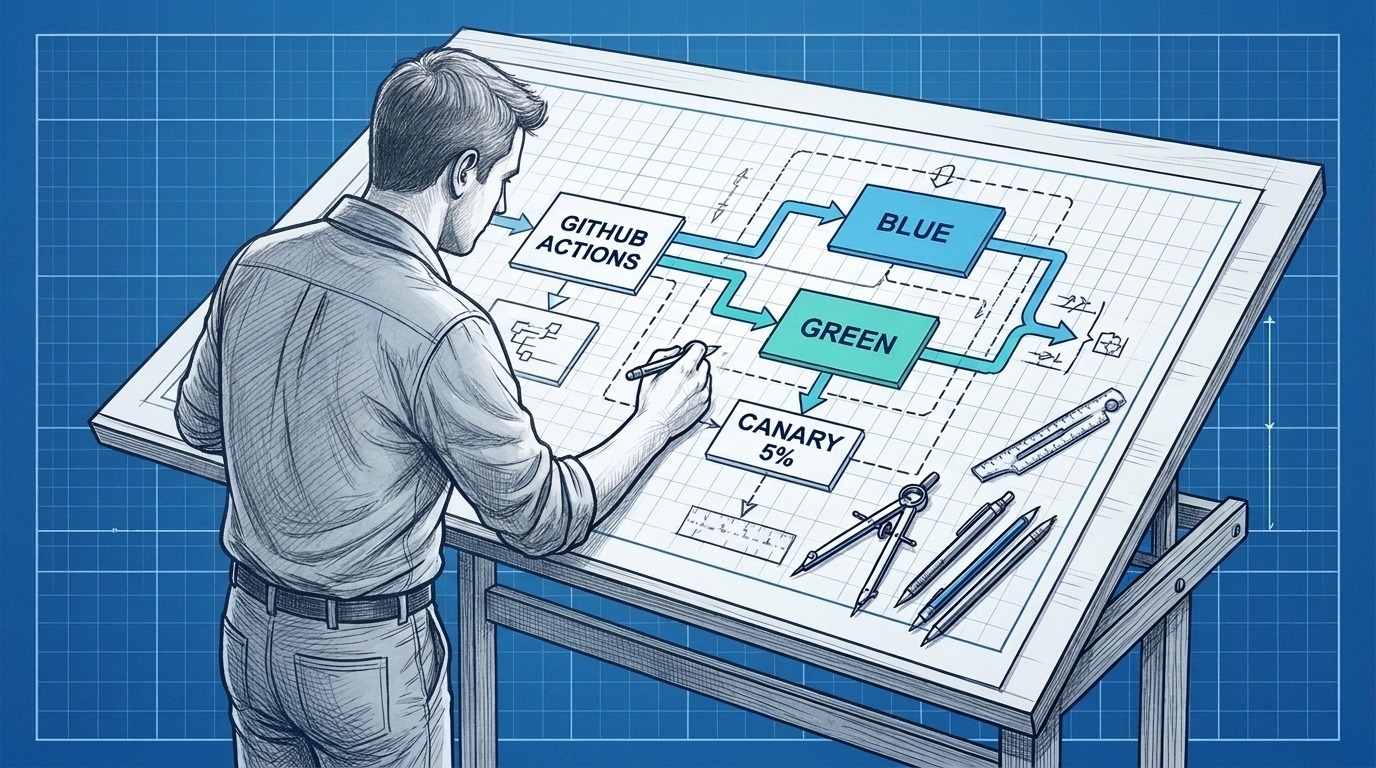
In mid-to-senior DevOps and Platform Engineering hiring loops, interviewers rarely stop at asking how a YAML workflow builds a container image. Instead, they open with a production failure scenario: "Your team ships twenty pull requests a day through GitHub Actions to a payment-processing API serving 12,000 requests per second. Last Tuesday, a release passed all unit and integration tests in staging, yet rolling it out to production triggered a silent 8% checkout failure rate on older iOS clients—and the automated rollback took 14 minutes while Kubernetes terminated healthy pods and re-pulled old images. Worse, the release included a database migration that dropped a legacy column. How do you redesign the pipeline using blue-green or canary deployment strategies so bad releases are isolated to a small blast radius and rolled back in seconds?"
Candidates who respond with "just add more end-to-end tests" or "switch to blue-green because it never has downtime" miss the real evaluation criteria behind ci cd github actions deployment strategies blue green canary questions. Hiring panels use this prompt to test whether an engineer understands traffic-shifting boundaries, stateful database compatibility, automated error-budget gates, GitHub Actions OIDC security, and infrastructure cost trade-offs.
Preparing for these architecture trade-offs fits naturally inside a broader technical interview preparation plan. This guide compares Blue-Green, Canary, and Rolling deployments, walks through production-grade GitHub Actions YAML patterns, details zero-downtime schema migrations, and provides a scoring rubric for live devops interview rounds.
Rolling vs. Blue-Green vs. Canary: Architectural Mechanics
Before choosing a strategy in an interview, define the exact unit of change—compute instances, Kubernetes pods, or serverless aliases—and separate artifact deployment (provisioning new code) from traffic release (exposing live users to that code).
1. In-Place Rolling Updates
A Rolling Update (such as Kubernetes RollingUpdate with maxSurge and maxUnavailable) incrementally replaces old pods or VMs with new ones behind a single service endpoint.
- Strengths: Requires minimal extra compute capacity (
maxSurge: 25%) and needs no external service mesh or weighted ingress controller. - Interview Trap: Rolling updates mix old and new application versions simultaneously inside the same target group with zero traffic isolation. If a memory leak or serialization bug surfaces only under production load, rolling back requires re-deploying the previous container tag across nodes—often taking several minutes while cold pods warm JIT caches or connection pools. For pod startup and termination pitfalls during rollouts, review Kubernetes pod eviction and CrashLoopBackOff troubleshooting.
2. Blue-Green Deployment
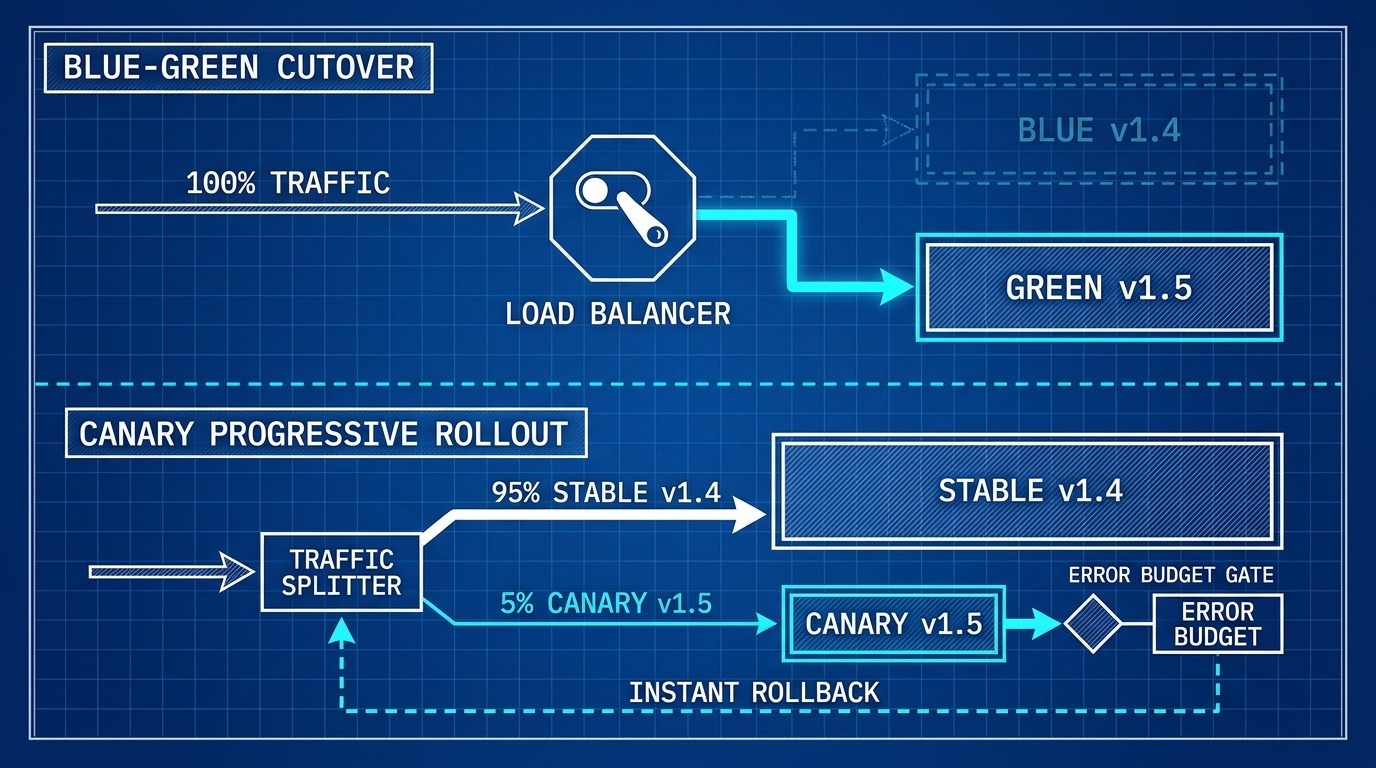
A Blue-Green Deployment maintains two complete, production-identical environments: Blue (currently serving 100% of live traffic) and Green (idle or staging the incoming release).
- GitHub Actions builds the artifact, provisions or updates the Green fleet, and runs synthetic smoke tests against an internal preview URL (
green-internal.example.com). - Once Green passes readiness probes, an atomic router switch (AWS ALB target group weight swap, CloudFront origin flip, or Kubernetes Service selector update) shifts 100% of production traffic from Blue to Green.
- Blue remains warm for a soak window (for example, 30–60 minutes) so an operator or automated webhook can flip traffic back to Blue in seconds if error rates spike.
- Trade-Off: Blue-Green delivers near-instant rollback and eliminates mixed-version traffic skew during normal operation, at the cost of 2x peak compute capacity during releases and the risk of an "all-at-once" 100% blast radius when the switch flips.
3. Canary Deployment
A Canary Deployment routes a small, controlled fraction of live production traffic (such as 2%, then 10%, then 50%, then 100%) to the new version while monitoring golden signals—HTTP 5xx error rates, p99 latency, and saturation—at every step.
- Strengths: Caps the blast radius of undetected production regressions to a tiny percentage of users (or internal employee headers first) and requires far less duplicate infrastructure than a full Blue-Green mirror.
- Trade-Off: Demands mature observability and L7 traffic management (NGINX Ingress, Envoy/Istio, AWS App Mesh, or Argo Rollouts). If telemetry lacks clean version labels (
version="v1.5-canary"), a 2% regression disappears inside aggregate 98% baseline averages.
Deployment Strategy Trade-Off Matrix
Use this comparison table when interviewers ask you to defend blue green vs canary deployment choices under concrete constraints:
| Dimension | Rolling Update | Blue-Green Deployment | Canary Deployment |
|---|---|---|---|
| Traffic Cutover | Gradual pod/VM replacement; unsegmented | Atomic 0% → 100% router switch | Progressive weighted split (e.g., 5% → 25% → 100%) |
| Blast Radius on Bug | Moderate to high (grows as rollout proceeds) | High (100% of live users on cutover) | Minimal (capped at initial canary slice, e.g., 1–5%) |
| Rollback Latency | Minutes (re-schedule old pods, pull images) | Seconds (flip load balancer pointer back to Blue) | Seconds (set canary weight back to 0%) |
| Extra Compute Cost | Low (+10% to +25% surge capacity) | High (+100% duplicate fleet during release) | Low to Moderate (+5% to +20% canary capacity) |
| Version Skew Risk | High (v1 and v2 serve side by side) | Low (single active version post-flip, except active sessions) | High (v1 and v2 run concurrently for hours) |
| Tooling Complexity | Built into Kubernetes, ECS, ASGs | Load balancer target groups + DNS/ALB swap | Service mesh, Argo Rollouts, or L7 weighted ingress + Prometheus |
| Best Workload Fit | Stateless internal services with fast startup | Regulated monoliths, firmware APIs, compliance sign-off | High-traffic SaaS APIs, consumer checkout, ML inference |
Designing a Production GitHub Actions CI/CD Pipeline
When an interviewer asks you to sketch a github actions ci cd pipeline, emphasize security boundaries, artifact immutability, environment protection gates, and automated rollback triggers rather than generic npm test steps.
Key GitHub Actions Architecture Choices to Call Out
- Build Once, Promote Everywhere: Compile and push one immutable container digest (
ghcr.io/org/payments@sha256:...) during CI, sign it with Cosign/Sigstore, and promote that exact SHA through staging and production. Never rebuild the image per environment. - Short-Lived OIDC Credentials: Authenticate GitHub Actions runners to AWS, GCP, or Azure via OpenID Connect (
id-token: write) instead of storing static long-lived IAM keys in repository secrets. - Concurrency Locks and Environment Approvals: Use
concurrency:groups per target environment so two merged PRs cannot race each other mid-rollout—mirroring the locking discipline covered in Terraform state locking and drift interview guides.
Example GitHub Actions Canary Workflow with Automated Metric Gate
Below is an interview-ready workflow skeleton demonstrating immutable digest promotion, weighted canary progression, and automated rollback if Prometheus or CloudWatch reports an SLO breach:
name: deploy-payments-canary

on:
  push:
    branches: [main]

permissions:
  id-token: write   # Required for keyless AWS/GCP OIDC federation
  contents: read

concurrency:
  group: prod-payments-deploy
  cancel-in-progress: false # Queue deployments; never kill an active cutover mid-flight

jobs:
  build-and-sign:
    runs-on: ubuntu-latest
    outputs:
      image_digest: ${{ steps.build.outputs.digest }}
    steps:
      - uses: actions/checkout@v4
      - name: Build and push immutable image
        id: build
        run: |
          docker build -t ghcr.io/acme/payments:${{ github.sha }} .
          docker push ghcr.io/acme/payments:${{ github.sha }}
          DIGEST=$(docker inspect --format='{{index .RepoDigests 0}}' ghcr.io/acme/payments:${{ github.sha }})
          echo "digest=$DIGEST" >> "$GITHUB_OUTPUT"

  canary-rollout:
    needs: build-and-sign
    runs-on: ubuntu-latest
    environment: production # Enforces required reviewers or deployment branch rules
    steps:
      - name: Configure AWS credentials via OIDC
        uses: aws-actions/configure-aws-credentials@v4
        with:
          role-to-assume: arn:aws:iam::123456789012:role/gha-prod-deployer
          aws-region: us-east-1

      - name: Deploy canary at 5% traffic weight
        run: |
          kubectl argo rollouts set image payments-api \
            payments=${{ needs.build-and-sign.outputs.image_digest }}
          kubectl argo rollouts resume payments-api

      - name: Monitor canary error budget (10m soak)
        id: verify
        run: |
          # Wait for Argo Rollouts AnalysisRun (Prometheus 5xx < 0.5% and p99 < 250ms)
          kubectl argo rollouts status payments-api --watch --timeout 900s

      - name: Auto-abort and restore 100% baseline on failure
        if: failure()
        run: |
          kubectl argo rollouts abort payments-api
          kubectl argo rollouts undo payments-api
          exit 1
In a Kubernetes environment, pairing this GitHub Actions pipeline with declarative manifest overlays—explored in Helm vs Kustomize Kubernetes deployment interviews—keeps image digest promotion clean without mutating unrelated cluster resources.
Why Blue-Green and Canary Fail: Database Migrations & Stateful Traps
Every experienced interviewer eventually introduces a stateful twist: "Your canary rollback shifted 100% of traffic back to v1.4 in three seconds—and now v1.4 is crashing with SQL errors because v1.5's migration renamed a column. Why did your rollback break production?"
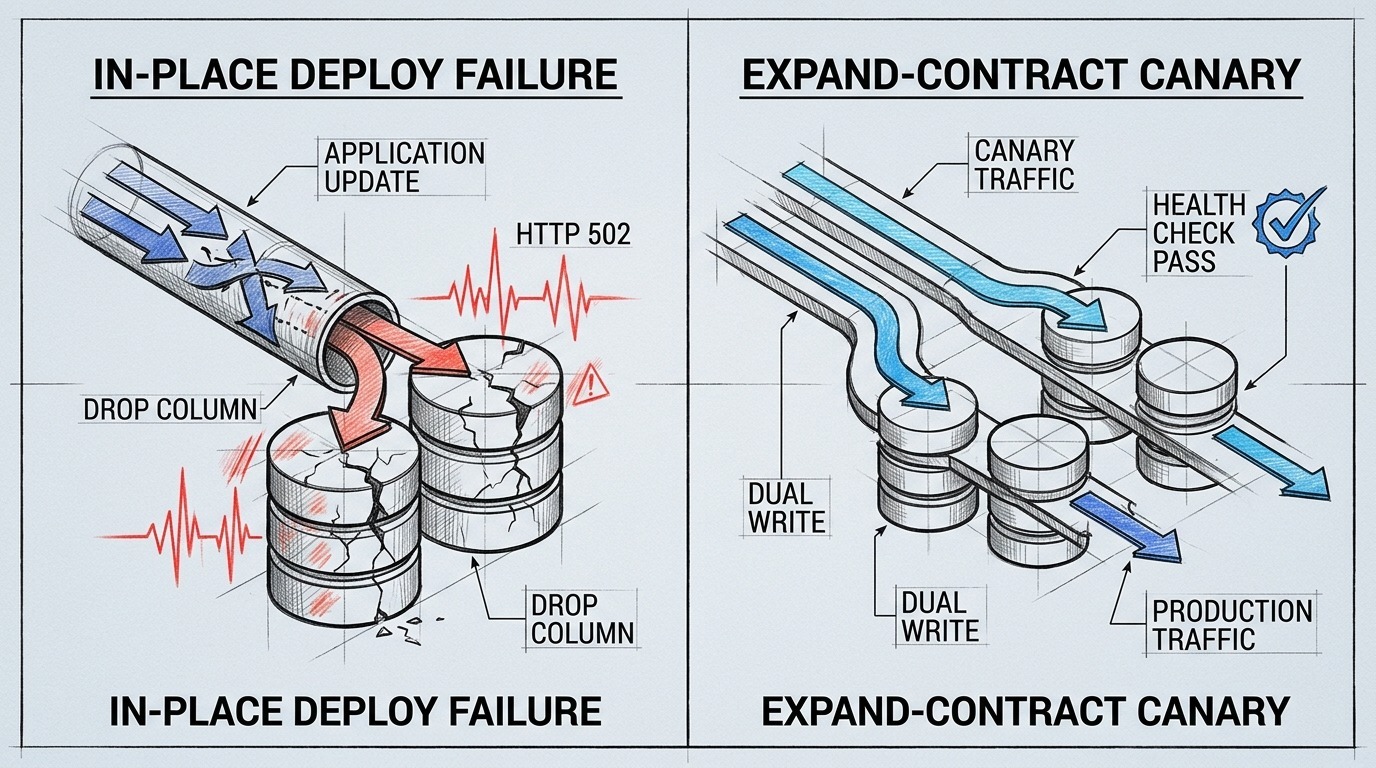
A canary rollback strategy is only as safe as the backward compatibility of the underlying data layer. Because Blue and Green (or Stable and Canary) share the same database cluster, schema changes must always be decoupled from code deployments using the Expand-and-Contract pattern:
The 4-Phase Expand-and-Contract Playbook
- Expand (Additive Migration Only): Add the new column (
payment_method_v2) as nullable, or create the new indexCONCURRENTLYin PostgreSQL so table locks never block live writes. Deploy nothing that removes or renames columnsv1.4still reads. - Dual-Write & Backfill (
v1.5Canary): Releasev1.5, which writes to both the legacy column and the new column, while a background worker backfills historical rows in small throttled batches. Ifv1.5fails canary verification and rolls back tov1.4,v1.4continues reading and writing the legacy column seamlessly. - Switch Reads & Promote (
v1.6): Oncev1.5reaches 100% stability and backfill completes, deployv1.6to read exclusively frompayment_method_v2while optionally keeping dual-writes active for one extra rollback window. - Contract (Cleanup Release): Only after
v1.5is no longer a rollback candidate, run a separate cleanup migration dropping the obsolete legacy column.
Three Other Hidden Failure Modes Interviewers Probe
- Long-Lived Connections & gRPC Pinning: HTTP/2 and gRPC multiplex thousands of RPCs over a single persistent TCP connection. Even if an L4 load balancer shifts weights to
0%, existing client connections stay pinned to canary pods unless L7 Envoy/ALB routing or server-sideGOAWAYconnection draining is configured. - Sticky Sessions & Browser Cache Skew: In Blue-Green frontend + API deploys, a user holding cached
v1.4JavaScript assets may post a payload to av1.5Green backend that expects a new required JSON field. Versioned API endpoints (/v2/...) or additive schema tolerance prevent client-server skew. - Cold Cache & Connection Pool Storms: On an instant Blue-Green cutover, the Green fleet starts with cold in-memory caches and empty database connection pools. Pre-warming Green caches via shadow traffic mirroring (traffic teeing) before shifting live users prevents a thundering herd on cutover.
Scenario Walkthrough: How to Answer a Live Deployment Trade-Off Prompt
Suppose an interviewer asks: "Design a release pipeline on GitHub Actions for a multi-tenant SaaS billing service with strict uptime SLAs. Would you choose Blue-Green or Canary, and how do you automate rollback?"
Structure a 3-minute senior-level response across four clear checkpoints:
- Clarify Traffic, State, and Cost Constraints: Confirm requests per second, whether stateful WebSockets or database migrations are involved, and whether the team can afford 2x compute during Blue-Green cutovers.
- Select the Hybrid Pattern Explicitly: Recommend Canary progressive delivery (1% → 10% → 50% → 100%) for stateless API tiers so silent client regressions only impact 1% of traffic, paired with Blue-Green target-group swaps if compliance requires full pre-cutover smoke validation in isolation.
- Define Objective Rollback Gates: Specify exact automated triggers—such as
5xxerror rate > 0.5% over a 5-minute window,p99latency > +30% vs. baseline control pods, or pod readiness failures—checked by Argo Rollouts or AWS CodeDeploy alarms before advancing weight. For deeper on-call metrics framing, align those gates with the SLI/SLO principles in Site Reliability Engineer interview questions. - Protect Stateful Boundaries: State unequivocally that database migrations run as standalone additive
Expandjobs before application rollouts, guaranteeing that an instant weight shift back to0%never breaks old application instances.
DevOps Interview Evaluation Rubric: Deployment Strategies
Interviewers score candidates on operational depth rather than buzzword recall. Compare weak answers against senior-level signals:
| Evaluation Dimension | Weak / Red-Flag Answer | Senior / Strong Hire Signal |
|---|---|---|
| Strategy Selection | "Blue-green always has zero downtime, so we use it everywhere." | Weighs 2x compute cost, blast radius (100% flip vs. 5% canary slice), and L7 mesh complexity against workload risk. |
| GitHub Actions Security | Stores static AWS access keys in GitHub Secrets and builds fresh images per stage. | Uses keyless OIDC (id-token: write), immutable SHA digests, concurrency locks, and manual environment approvals. |
| Rollback Mechanics | "Run git revert and re-trigger the CI pipeline." | Distinguishes instant traffic-pointer rollback (<10s) from slow artifact re-deployment; warns about cache warming and HTTP/2 connection draining. |
| Database Safety | Runs prisma migrate or DROP COLUMN inside the app startup script. | Enforces Expand-and-Contract decoupled migrations so N and N-1 application versions remain schema-compatible simultaneously. |
| Observability Gates | Relies on HTTP 200 /health liveness check once after deploy. | Monitors version-tagged golden signals (5xx, p99, saturation, business KPIs) against a baseline control group over soak windows. |
To reinforce cloud infrastructure fundamentals that support these pipelines—such as IAM least-privilege roles and multi-AZ target groups—review AWS interview questions for cloud engineers and the broader DevOps engineering interview guide.
Rapid-Fire DevOps Deployment Prep with totop.app
Reading deployment architecture diagrams builds conceptual clarity, yet live DevOps interviews test how concisely you defend trade-offs under time pressure and follow-up interruptions.
- Benchmark Your Recall in 60 Seconds: Jump into the 60-Second Job Blitz to test rapid-fire DevOps, CI/CD, and cloud troubleshooting recall with zero login required.
- Simulate Realistic Follow-Up Probing: Paste your target DevOps or Platform Engineer job description into totop.app, rehearse answering live incident and deployment prompts out loud, and use the built-in Socratic Tutor to stress-test your rollback and schema safety assumptions.
- Explore Plans & Free Trial: Start with free practice tests or unlock unlimited voice and text mock interviews on the totop.app pricing page.
Practice DevOps Specialist Questions Live with AI Mock Interviews
Turn any job description across Engineering, DevOps, Data, Marketing, Sales, Finance, or HR into a personalized test and live voice or text AI mock interview on totop.app, or test your speed right now in the 60-Second DevOps Specialist Blitz.
Play 60s DevOps Specialist Blitz (Free, No Login) | Start 14-Day Free Trial | Browse All Interview Guides