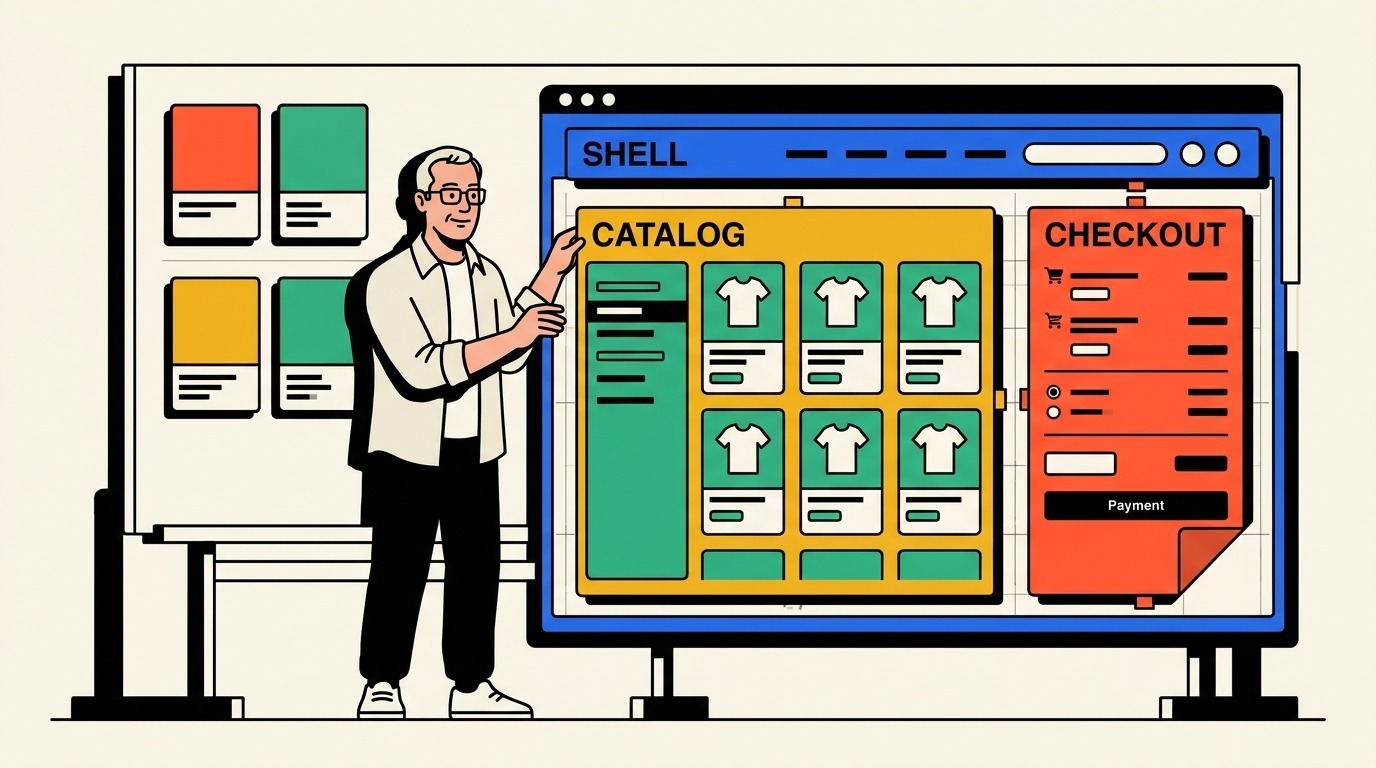
In senior and staff frontend system design interviews, candidates are rarely asked to simply define what a micro frontend is. Instead, interviewers introduce an organizational scaling tension and wait to see whether the candidate reaches for hype or engineering discipline: "Eight product squads share a single React monolith. Build times have crept past 18 minutes, one broken test blocks releases across checkout and search, and two teams want to upgrade the router independently. Should the organization adopt micro frontends, and what trade-offs would you accept or reject?"
Candidates who immediately answer "yes, split everything into Module Federation remotes" fail the micro frontends architecture trade offs interview. Micro frontends are an organizational scaling pattern, not a runtime performance optimization. Splitting a single browser application across independent deployment pipelines introduces shared-dependency version drift, CSS specificity collisions, cross-bundle payload bloat, and distributed debugging complexity.
Strong candidates treat micro frontends as a calculated architectural trade-off—comparing them against modular monoliths, monorepo build caching, and vertical slice ownership before choosing an integration boundary.
Why Organizations Split (or Keep) a Frontend Monolith
A common misconception in micro frontends vs monolith discussions is that micro frontends exist to make an application faster for end users. In reality, a well-tuned monolith using route-based code splitting almost always ships fewer kilobytes and fewer network round trips than a federated multi-bundle architecture.
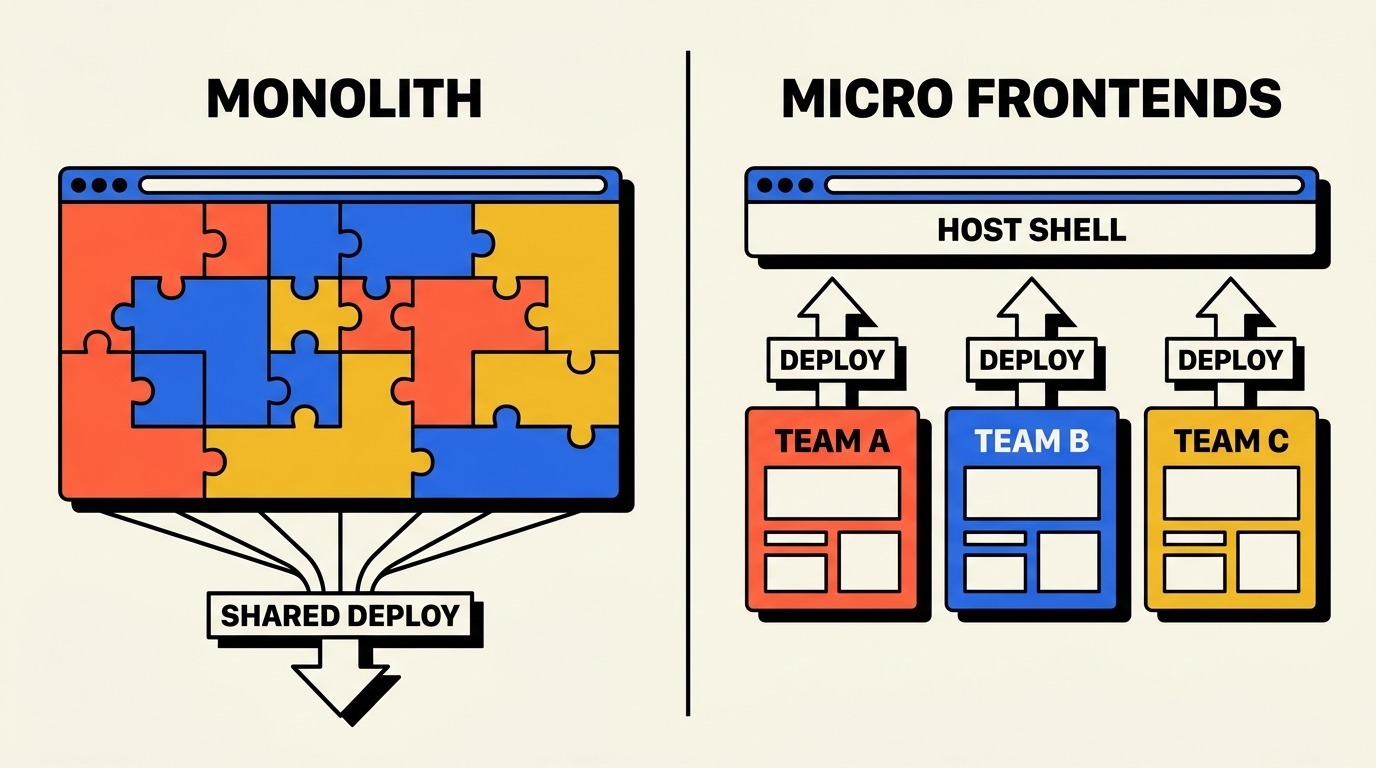
Hiring managers evaluate whether candidates distinguish between codebase coupling and deployment coupling:
- Choose a Modular Monolith (Monorepo + Workspace Boundaries) when: Three to five teams share a unified release cadence, use the same core framework (such as React 19), and suffer primarily from slow CI builds or tangled imports. Tools like Turborepo, Nx, and strict ESLint module-boundary rules eliminate build bottlenecks without taking on runtime orchestration overhead.
- Choose Micro Frontends when: Multiple autonomous squads own distinct business domains (for example, Search, Catalog, Checkout, and Account Settings) that require independent production release cycles, separate rollback blast radii, or incremental framework migrations across legacy and modern stacks.
If an engineering organization lacks automated contract testing, centralized observability, and an agreed design system governance process, micro frontends simply convert compile-time merge conflicts into runtime production outages.
Integration Patterns Compared: Build-Time vs. Runtime Composition
During a frontend architecture trade-offs whiteboard session, interviewers expect candidates to compare concrete composition mechanisms rather than speaking in abstractions. Each approach shifts complexity between build pipelines, browser runtime latency, and visual isolation.
| Architecture Pattern | Bundle & Performance Impact | Shared Dependencies | Independent Deployability | Style & DOM Isolation | Routing & SSR Support | Ideal Use Case |
|---|---|---|---|---|---|---|
| Modular Monolith (NPM Workspaces) | Lowest payload; single tree-shaken graph | Guaranteed single version via lockfile | No (coordinated release train) | Shared CSS cascade; requires conventions | Native SSR and unified client routing | 1–6 squads on one framework sharing release cadences |
| Build-Time Packages (Private Registry) | Moderate; requires rebuild of host on update | Managed via peerDependencies | Partial (still requires host CI rebuild) | Low; relies on CSS Modules or Tailwind | Full SSR support in host | Shared UI libraries and low-churn domain widgets |
| Module Federation (Webpack / Rspack) | Moderate; extra remoteEntry.js manifest fetch | Configurable singleton: true negotiation | Yes (runtime remote updates without host rebuild) | Low unless scoped; shared window and CSS | Possible via streaming SSR federation, higher complexity | Large multi-team SPAs standardized on one core framework |
| Single-SPA / Import Maps | Higher initial orchestrator overhead | Shared via SystemJS or native browser import maps | Yes (independent lifecycle mount/unmount) | Low; teams must namespace CSS or use Shadow DOM | Primarily CSR; SSR requires custom edge stitching | Incremental migration from legacy Angular/Vue to React |
| Web Components (Custom Elements) | Low framework adapter overhead if lean | Harder to deduplicate large framework runtimes | Yes (self-contained custom element bundles) | High when using Shadow DOM encapsulation | Limited SSR parity (Declarative Shadow DOM caveats) | Embeddable cross-framework widgets (headers, checkout bars) |
| Iframes / Edge Composition (ESI/SSI) | Heavy (iframes duplicate browser contexts); edge SSI is lean | Zero sharing in iframes; isolated memory | Yes (complete deployment and runtime isolation) | Complete isolation in iframes | Edge fragments excel at SSR; iframes hurt SEO & deep links | Untrusted third-party embeds or strict PCI/compliance zones |
When comparing single-spa vs module federation in an interview, highlight the primary distinction: Module Federation solves build-graph sharing and runtime module loading natively inside the bundler, whereas Single-SPA acts as a framework-agnostic lifecycle router (bootstrap, mount, unmount) for heterogeneous apps coexisting on the same page.
Runtime Module Federation Architecture & Shared Singletons
In modern module federation interview questions, interviewers frequently probe how the browser resolves shared libraries at runtime without loading two copies of React or breaking React Context.
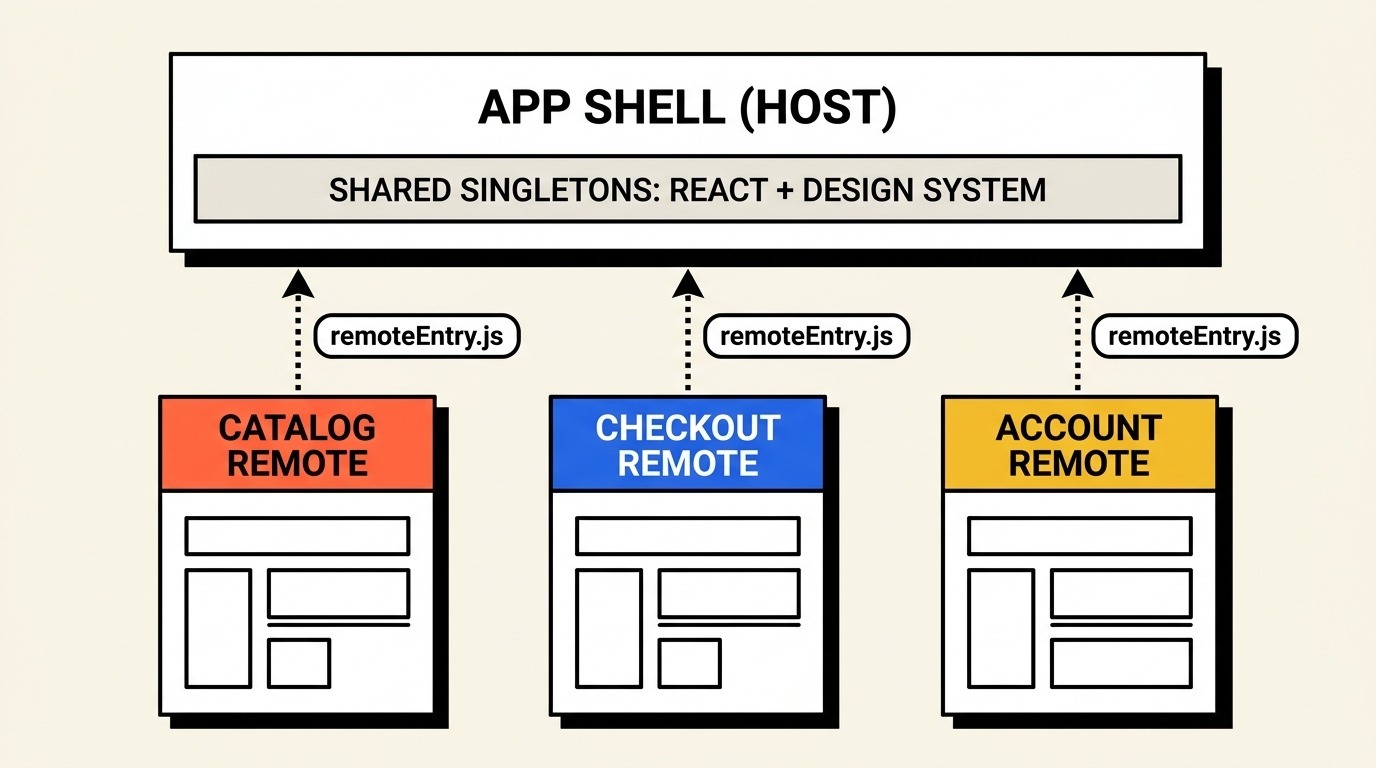
In a federated setup, a thin App Shell (Host) owns top-level authentication, global navigation, analytics initialization, and top-level route matching. Vertical domain teams build Remotes that expose entry components through a lightweight manifest (remoteEntry.js).
Production Pattern: Resilient ModuleFederationPlugin Configuration
Interviewers look for precision around singleton, strictVersion, and requiredVersion. Misconfiguring these fields triggers the notorious Invalid hook call error when two bundles instantiate separate copies of React:
// rspack.config.js (Host Shell or Remote Team Build)
const { ModuleFederationPlugin } = require('@module-federation/enhanced/rspack');
const deps = require('./package.json').dependencies;

module.exports = {
  plugins: [
    new ModuleFederationPlugin({
      name: 'checkout_remote',
      filename: 'remoteEntry.js',
      exposes: {
        './CheckoutFlow': './src/components/CheckoutFlow',
      },
      shared: {
        react: {
          singleton: true,
          requiredVersion: deps.react,
          strictVersion: false, // Warn on mismatch instead of crashing host
        },
        'react-dom': {
          singleton: true,
          requiredVersion: deps['react-dom'],
          strictVersion: false,
        },
        '@acme/design-tokens': {
          singleton: true,
          requiredVersion: '^3.2.0',
        },
      },
    }),
  ],
};
Wait for the interviewer's follow-up: "What happens if the Checkout remote team ships a broken bundle or their CDN edge returns a 502 for remoteEntry.js?"
If the host statically imports the remote without defensive isolation, a single team's broken deploy crashes the entire application shell. Production systems wrap every federated boundary in a React Error Boundary, a Suspense fallback, and a versioned cache-busting manifest rather than letting remoteEntry.js get cached indefinitely by Cache-Control: max-age=31536000.
import React, { Suspense } from 'react';

const RemoteCheckout = React.lazy(() => import('checkout_remote/CheckoutFlow'));

class MicroFrontendBoundary extends React.Component<
  { fallback: React.ReactNode; children: React.ReactNode },
  { hasError: boolean }
> {
  state = { hasError: false };

  static getDerivedStateFromError() {
    return { hasError: true };
  }

  componentDidCatch(error: Error) {
    // Emit structured telemetry with remote name + release SHA
    console.error('Micro frontend boundary failure:', error);
  }

  render() {
    if (this.state.hasError) {
      return this.props.fallback;
    }
    return this.props.children;
  }
}

export function CheckoutMount() {
  return (
    <MicroFrontendBoundary fallback={<div>Checkout is temporarily unavailable.</div>}>
      <Suspense fallback={<div>Loading checkout...</div>}>
        <RemoteCheckout />
      </Suspense>
    </MicroFrontendBoundary>
  );
}
Production Failure Scenario: Debugging Version Drift, CSS Collisions & Latency Regressions
Strong system design answers always include operational failure modes. Walk interviewers through three failure patterns that surface in production micro frontend architectures:
1. Stale remoteEntry.js Manifest & Chunk Hash Mismatches
When a team deploys an updated remote while a user has an older host session open, or when a CDN caches remoteEntry.js aggressively while overwriting chunk files (chunk-4a9f.js), the browser throws ChunkLoadError. Mitigation requires setting Cache-Control: no-cache, must-revalidate on the tiny remoteEntry.js manifest (or fetching a runtime manifest JSON from an edge config service with versioned sub-paths like /remotes/checkout/v2026.11.19/remoteEntry.js) while keeping immutable long-lived caching on content-hashed JS chunks.
2. Core Web Vitals Regressions (LCP & INP Waterfall Chains)
Micro frontends introduce sequential network waterfalls: the browser downloads shell.js → parses it → fetches remoteEntry.js → negotiates shared scopes → fetches CheckoutFlow.chunk.js → finally requests API data. That serial waterfall pushes Largest Contentful Paint (LCP) past the 2.5-second budget. As detailed in our Core Web Vitals LCP, INP, and CLS optimization guide, senior engineers mitigate this by preloading critical remote manifests in <head>, keeping the host shell tiny, and avoiding nested micro frontends inside above-the-fold hero views.
3. Cross-Team State Coupling & CSS Specificity Leaks
If Team A and Team B share a monolithic Redux store across remote boundaries, independent deployability disappears immediately because every schema change requires coordinated deployments. Instead, examine the state isolation patterns in our React state management Redux vs Zustand vs Context comparison: keep domain state strictly local to each micro frontend, pass minimal identity/locale context via props or read-only host SDKs, and communicate cross-domain events via URL query parameters or typed browser CustomEvent contracts. On the styling side, enforce unique CSS prefixes, CSS Modules, or @layer cascade ordering so one remote's utility classes never override another's modal z-index.
Interview Evaluation Rubric: L4 vs. L5 vs. L6 Answers
Interview panels calibrate leveling based on how candidates frame cross-team frontend scaling and operational governance. Use this rubric to benchmark your depth before your next loop:
| Evaluation Dimension | L4 (Mid-Level) | L5 (Senior Engineer) | L6 (Staff / Principal Architect) |
|---|---|---|---|
| Architecture Decision | Treats micro frontends as an unquestioned best practice for large apps. | Weighs team autonomy against bundle overhead; starts with a modular monolith first. | Links architecture directly to Conway's Law, CI/CD release autonomy, and explicit Architecture Decision Records (ADRs). |
| Dependency & State Boundaries | Suggests sharing one global Redux store across all remotes. | Enforces singleton React versions and isolates local state inside each vertical slice. | Designs strict versioned contracts (URL state, custom events, schema validation) and backward-compatible shared SDKs. |
| Failure & Resilience Design | Assumes remotes always load cleanly from the CDN. | Wraps remote mounts in Error Boundaries and Suspense fallbacks. | Plans canary rollouts, immutable versioned remote URLs, synthetic monitoring, and graceful feature degradation. |
| Performance & UX Consistency | Ignores waterfall latency or duplicate design system CSS. | Identifies remoteEntry.js network chains and recommends preloading and shared design tokens. | Establishes automated bundle budgets, Core Web Vitals telemetry per remote, and shared design-token governance. |
When framing the governance side of these decisions, pairing technical metrics with Architecture Decision Records (ADRs) for system design interviews signals staff-level ownership immediately.
Step-by-Step Answering Framework for Live System Design Interviews
When an interviewer opens a micro frontends architecture trade offs interview prompt, follow a disciplined 5-step cadence rather than jumping straight to tooling:
- Diagnose the Bottleneck First (2 minutes): Ask clarifying questions. Are teams blocked by CI compile times, flaky end-to-end test suites, conflicting product roadmaps, or genuine compliance/deployment isolation needs?
- Propose the Simplest Viable Alternative (3 minutes): Explain how a Turborepo/Nx modular monolith solves build caching and strict domain boundaries without runtime fragmentation, and identify the exact organizational inflection point (typically 6+ autonomous teams) where runtime micro frontends become justified.
- Select and Justify the Composition Boundary (5 minutes): Choose vertical domain slices (route-level ownership per team) over horizontal fragment splits (separate micro frontends for header, sidebar, and button). Explain why route-level Module Federation or Web Components fits the team's framework homogeneity.
- Harden Shared Contracts and Performance (5 minutes): Cover singleton dependency negotiation, isolated state boundaries, CSS
@layeror CSS Module encapsulation, and Core Web Vitals preload strategies. Review foundational DOM and rendering mechanics in our React interview questions guide and HTML, CSS, and JavaScript frontend guide so low-level browser follow-ups never catch you off guard. - Define Operational Safeguards (3 minutes): Specify Error Boundaries, immutable versioned CDN deploys for
remoteEntry.js, synthetic Playwright checks across composed hosts, and per-remote error attribution in RUM telemetry.
For broader preparation across coding, architecture, and behavioral rounds, anchor your weekly schedule with our complete technical interview preparation guide.
Practice Frontend Architecture Trade-Offs Under Interview Pressure
Knowing the difference between Module Federation and Single-SPA on paper is only half the battle—hiring panels score how crisply you defend those trade-offs when probed on version skew, waterfall latency, and organizational friction in real time.
Put your frontend system design instincts to the test on totop.app:
- Run through rapid-fire architecture, browser rendering, and React concurrency prompts in the 60-Second Job Blitz with zero login required to benchmark your recall speed.
- Ready for full-length whiteboard and voice simulations tailored to Senior or Staff Frontend Engineer job descriptions? Compare plans on our mock interview pricing page and practice defending your micro frontend architecture decisions with Socratic AI feedback.
Practice Full Stack Engineer Questions Live with AI Mock Interviews
Turn any job description across Engineering, DevOps, Data, Marketing, Sales, Finance, or HR into a personalized test and live voice or text AI mock interview on totop.app, or test your speed right now in the 60-Second Full Stack Engineer Blitz.
Play 60s Full Stack Engineer Blitz (Free, No Login) | Start 14-Day Free Trial | Browse All Interview Guides