Top Node.js Interview Questions for Backend Developers
Node.js has revolutionized modern backend development, enabling developers to build fast, scalable, and data-intensive applications using JavaScript on the server. If you are preparing for a backend engineering role, mastering Node.js fundamentals and its asynchronous nature is crucial.
In this guide, we dive into the most essential Node.js interview questions, covering everything from the event loop and architecture to performance optimization. Let's get you ready to ace that technical interview!
1. How does Node.js handle concurrency despite being single-threaded?
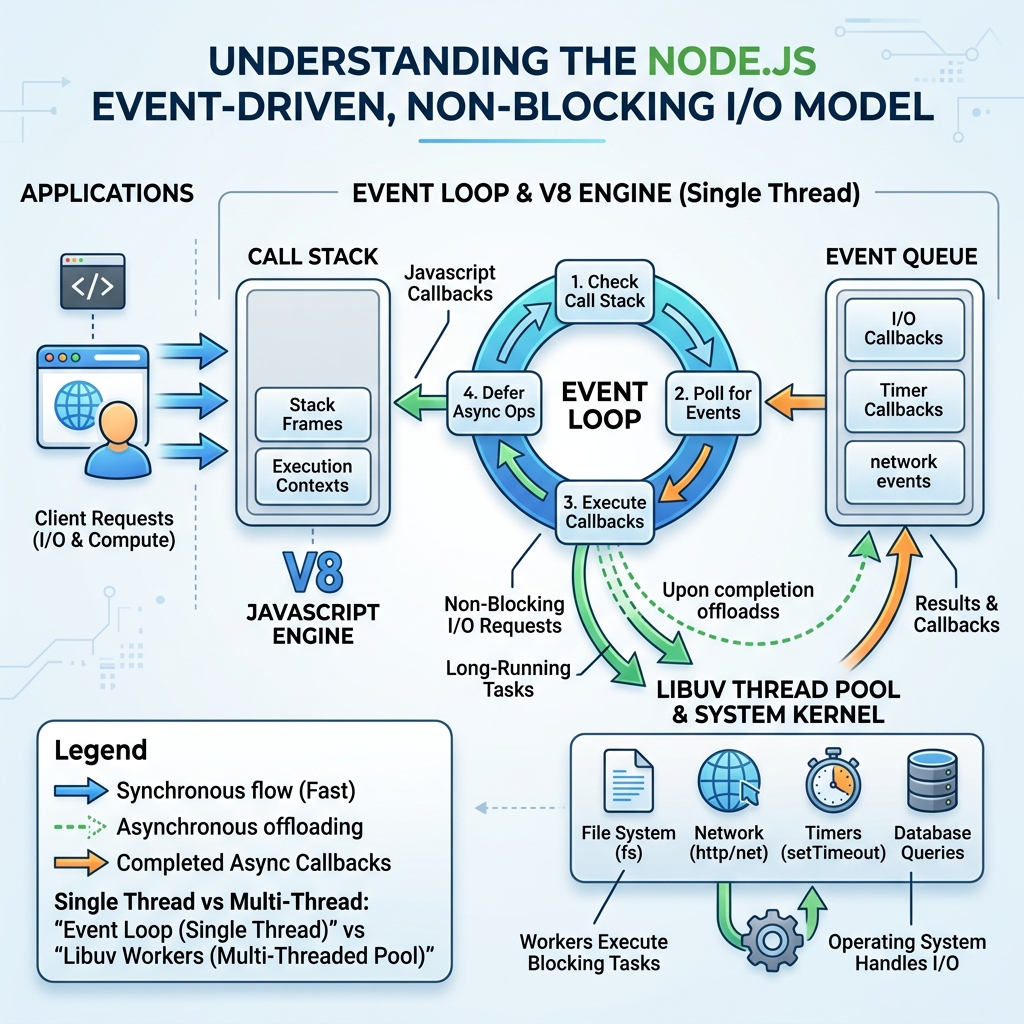
The Core Concept: This is perhaps the most fundamental Node.js question. While traditional web servers like Apache create a new thread for every request, Node.js operates on a single main thread using an Event-Driven, Non-Blocking I/O model.
Node.js delegates heavy I/O operations (like reading from a database, file system, or network) to the underlying operating system. When an I/O operation completes, the OS notifies Node.js, and the corresponding callback function is placed in the Event Queue.
The Event Loop constantly checks if the main thread (Call Stack) is empty. If it is, it takes the first callback from the Event Queue and executes it.
Key Takeaways to Mention:
- V8 Engine: Compiles and executes JavaScript synchronously.
- libuv: The C library that provides the event loop and the thread pool for handling I/O tasks asynchronously.
- High Concurrency: Because no thread is blocked waiting for I/O, Node.js can handle thousands of concurrent connections efficiently.
2. Explain the different phases of the Event Loop.
Understanding the internal phases of the Event Loop demonstrates deep architectural knowledge. The Event Loop iterates through several phases, each with its own FIFO queue of callbacks:
- Timers Phase: Executes callbacks scheduled by
setTimeout()andsetInterval(). - Pending Callbacks Phase: Executes I/O callbacks deferred to the next loop iteration (e.g., specific socket errors).
- Idle, Prepare Phase: Used internally by Node.js only.
- Poll Phase: Retrieves new I/O events. This is where Node.js spends most of its time waiting for connections or data. If the poll queue is empty, it will wait for timers unless
setImmediate()was called. - Check Phase: Executes callbacks scheduled explicitly via
setImmediate(). - Close Callbacks Phase: Executes close event callbacks (e.g.,
socket.on('close', ...)).
Note: Microtasks (like resolved Promises and process.nextTick()) are executed immediately after the current operation completes, effectively running between these phases.
3. What is the difference between process.nextTick() and setImmediate()?
Interviewer love asking this to test your understanding of asynchronous execution order.
process.nextTick(): This is NOT strictly part of the Event Loop phases. Callbacks passed toprocess.nextTick()are added to a "nextTickQueue." This queue is fully drained immediately after the current operation completes, before the Event Loop moves to its next phase. It's the highest priority asynchronous execution.setImmediate(): Callbacks are placed in the Check Phase queue and are executed during the next tick of the Event Loop, specifically after the Poll phase completes.
Rule of Thumb: Use process.nextTick() to emit events or call callbacks synchronously before I/O fires, but be careful not to recursively call it, or you will starve the event loop (preventing I/O and timers from ever running).
4. How do you handle exceptions and prevent a Node.js process from crashing?
Because Node.js is single-threaded, an uncaught exception will crash the entire application process, dropping all current connections.
Best Practices:
- Try/Catch for Sync Code & Async/Await: Always wrap synchronous logic and
awaitcalls intry/catchblocks. - Error-First Callbacks: Handle the
errargument properly in traditional callbacksif (err) return cb(err);. - Promise
.catch(): Always attach a.catch()block to your promise chains. - Event Emitters: Listen for the
'error'event on EventEmitters (like streams or servers). If unhandled, Node.js throws an exception. - Global Fallback: As a last resort, log and gracefully exit using
process.on('uncaughtException')orprocess.on('unhandledRejection'). Never keep the process running after an uncaught exception, as it enters an unpredictable state. Use a process manager like PM2 or Docker restart policies to reboot it automatically.
process.on('uncaughtException', (err) => {
  logger.error('Fatal Error, shutting down gracefully...', err);
  // Close database connections, servers, etc.
  process.exit(1);
});
5. What are Streams in Node.js and why are they important?
Streams are collections of data that might not be available all at once and don't have to fit in memory. They allow you to process data piece by piece.
Why they are important: Without streams, to serve a 1GB video file, Node.js would need to load the entire 1GB into RAM before sending it to the client. With streams, it can read chunks (e.g., 64KB) from the disk and pipe them directly to the HTTP response, using incredibly low memory.
Types of Streams:
- Readable: Streams from which data can be read (e.g.,
fs.createReadStream()). - Writable: Streams to which data can be written (e.g.,
fs.createWriteStream()). - Duplex: Streams that are both Readable and Writable (e.g., TCP sockets).
- Transform: Duplex streams that can modify or transform the data as it is written and read (e.g.,
zlib.createGzip()).
Prepare with Confidence
Answering Node.js interview questions isn't just about memorizing facts; it's about conveying your understanding of systems architecture and performance.
Want to practice these concepts in a realistic environment? Take your interview preparation to the next level by simulating real coding rounds and taking mock tests on totop.app. With structured environments and instant AI feedback, you'll walk into your next Node.js interview with absolute confidence!