
One of the highest-signal ways for an engineer to stand out in hiring loops—or validate a product idea—is shipping a complete, revenue-ready application in a single one-week sprint.
No months of Bikeshedding. No premature microservices. Just focused architectural execution.
Consider a common developer portfolio project and indie product archetype: a lightweight API observability dashboard that ingests webhook logs and generates clean, human-readable incident summaries. When you only have seven days (168 hours) to take an application from an empty Git repository to live production traffic, every technical choice matters.
This guide breaks down building a microsaas tech stack and lessons for rapid execution—covering the exact solo founder tech stack and rapid prototype deployment patterns that let developers ship production software in a week without accumulating crippling technical debt.
The Philosophy: Ship With "Boring Technology"
Before selecting individual libraries, the golden rule of a 7-day build is simple: proven, boring technology wins.
A one-week sprint is not the time to experiment with an unfamiliar database engine or custom build tooling. High-velocity builders lean on battle-tested TypeScript/JavaScript or Python primitives they know inside out.

Every layer of the stack is evaluated against three engineering criteria:
- Development Velocity: How fast can a developer go from schema definition to a working end-to-end feature?
- Low-Friction Deployment: Can commits deploy automatically with zero manual downtime?
- Headroom to Scale: If launch traffic spikes, can the database and API tier absorb the load without an immediate rewrite?
Here is the reference architecture for a 7-day Micro-SaaS build:
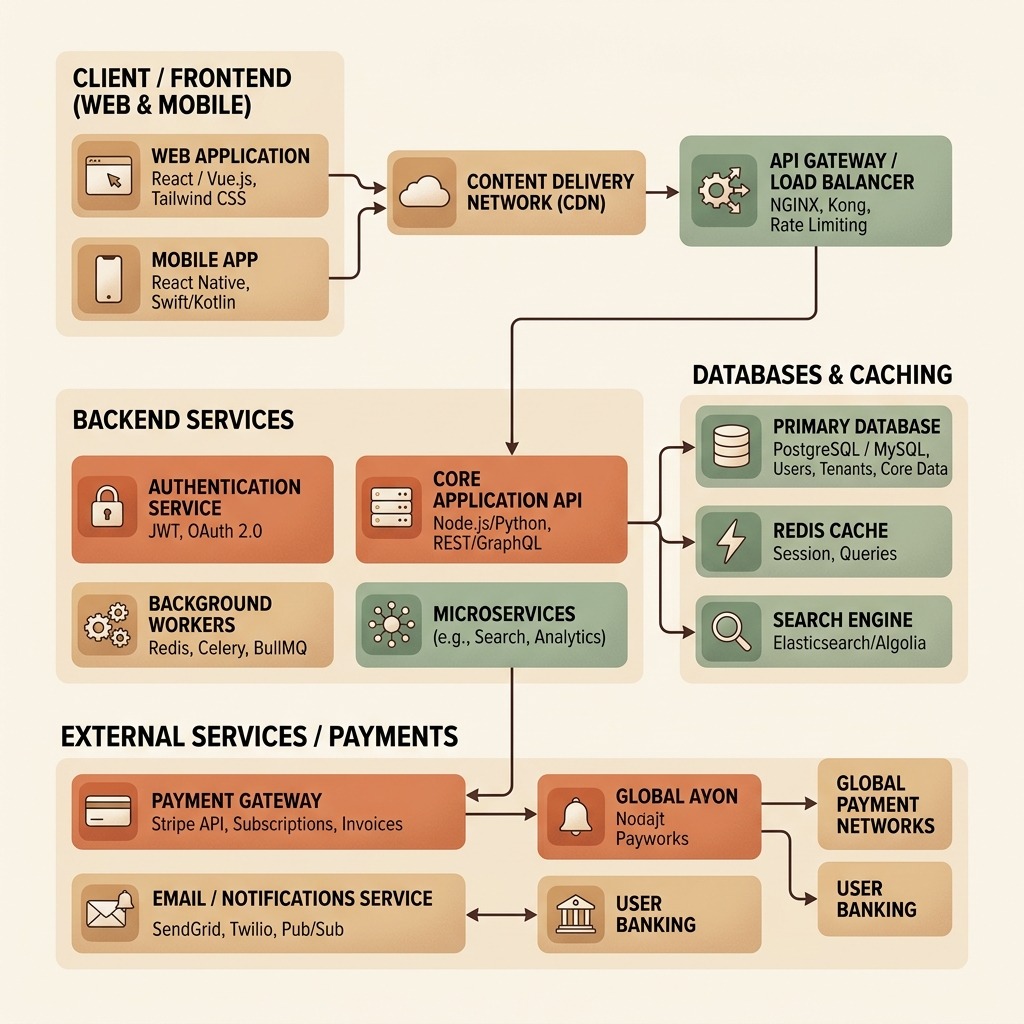
1. The Frontend: React + Vite + Tailwind CSS
For an interactive SaaS dashboard, a client-rendered Single Page Application (SPA) paired with static/prerendered marketing routes offers instant feedback loops during development:
- Vite: Delivers sub-second dev server startup and instantaneous Hot Module Replacement (HMR).
- Tailwind CSS: Eliminates context switching between component markup and separate stylesheet files while keeping production CSS bundles tiny.
- Lucide React: Provides clean, tree-shakeable SVG icons with zero configuration.
// Clean dashboard header component using React + Tailwind CSS
export function DashboardHeader({ user }) {
  return (
    <header className="flex items-center justify-between border-b border-gray-200 bg-white px-6 py-4">
      <div className="flex items-center space-x-3">
        <span className="text-xl font-bold text-gray-900">ZenSync</span>
      </div>
      <div className="flex items-center space-x-4">
        <span className="text-sm text-gray-600">{user.email}</span>
        <button className="rounded-lg bg-orange-600 px-4 py-2 text-sm font-semibold text-white hover:bg-orange-700 transition">
          Upgrade Plan
        </button>
      </div>
    </header>
  );
}
2. The Backend: Node.js (Express / Fastify) + TypeScript
While serverless functions work well for spiky workloads, a dedicated stateful API container avoids cold-start latency and simplifies database connection pooling:
- Express / Fastify + TypeScript: Shared types between the backend API payloads and frontend UI components catch contract mismatches at compile time.
- Connection Pooling (
pg): Maintains warm sockets to PostgreSQL. - Stateless JWT Authentication: Keeps session verification fast and horizontally scalable.
3. The Database: PostgreSQL + Prisma ORM
PostgreSQL is the default workhorse for modern Micro-SaaS architectures. It combines strict ACID relational guarantees with native JSONB indexing—ideal for storing semi-structured API log payloads alongside structured user accounts.
Pairing PostgreSQL with Prisma ORM provides declarative schema migrations and auto-generated TypeScript types:
datasource db {
  provider = "postgresql"
  url      = env("DATABASE_URL")
}

generator client {
  provider = "prisma-client-js"
}

model User {
  id        String   @id @default(uuid())
  email     String   @unique
  password  String
  createdAt DateTime @default(now())
  logs      ApiLog[]
}

model ApiLog {
  id        String   @id @default(uuid())
  userId    String
  user      User     @relation(fields: [userId], references: [id])
  method    String
  path      String
  status    Int
  payload   Json
  timestamp DateTime @default(now())
}
Running npx prisma migrate dev keeps the local database schema and TypeScript client synchronized in seconds.
4. Payments: Hosted Checkout Webhooks
Building custom credit card forms or subscription state machines from scratch during a 7-day sprint is a compliance and engineering trap.
Using Stripe Checkout (or Lemon Squeezy) offloads PCI compliance, tax calculation, and invoice generation to a hosted flow. The backend only needs a single signed webhook endpoint (checkout.session.completed) to provision the user's subscription tier in PostgreSQL.
5. Deployment: Docker Compose or Managed PaaS
Whether deploying via Docker Compose on a dedicated VPS or pushing to managed platforms like Railway and Vercel, automation is essential:
- Frontend Delivery: Served via Nginx or a global CDN with immutable asset caching.
- Backend & Database: Containerized Node.js API and PostgreSQL instance with automated daily backups and TLS termination.
Engineering Takeaways & Interview Preparation Checklist
Before heading into a live interview covering building a microsaas tech stack and lessons, review these core preparation principles to ensure your explanations are clear, structured, and grounded in real-world execution:
- Lead with a Concise Summary: Open every answer with a two-sentence executive headline before diving into implementation details or historical context.
- State Your Assumptions Explicitly: Clarify scale, constraints, team context, and edge cases early so the interviewer can calibrate the discussion with you.
- Compare At Least Two Alternatives: Senior candidates differentiate themselves by explaining why they chose a specific pattern over a simpler or more complex alternative, including the exact threshold where that trade-off flips.
- Quantify Impact & Verification: Whenever you share an example or propose a solution, explain how you measure success in practice—whether through latency/throughput metrics, test coverage, business KPIs, or post-deployment observability.
Key Takeaways from the 7-Day Sprint Blueprint
Shipping a complete product in a single week highlights the habits that hiring managers love seeing in full-stack and product-minded engineers:
- Avoid Premature Distributed Complexity: A well-indexed monolith with PostgreSQL handles thousands of active users before microservices or event brokers are ever needed.
- Contract-First UI Development: Mocking API responses on Day 1 allows frontend and backend workflows to progress without blocking on edge-case schema tweaks.
- Sharpen Your System Design Instincts: Rapid execution depends on knowing how to structure relational schemas, indexes, and auth flows without second-guessing. Practicing system design and full-stack architecture rounds on totop.app builds the architectural fluency needed to defend these trade-offs in technical interviews.
Practice Full Stack Engineer Questions Live with AI Mock Interviews
Turn any job description across Engineering, DevOps, Data, Marketing, Sales, Finance, or HR into a personalized test and live voice or text AI mock interview on totop.app, or test your speed right now in the 60-Second Full Stack Engineer Blitz.
Play 60s Full Stack Engineer Blitz (Free, No Login) | Start 14-Day Free Trial | Browse All Interview Guides