The Weirdest Production Bugs I've Seen in 10 Years of Coding
We’ve all been there. It’s 5:00 PM on a Friday. Your CI/CD pipeline flashes green. You pack your bag, ready to enjoy the weekend. Then, the PagerDuty alarm goes off.
Production is down.
Not just slow—down. But the logs make no sense. The error messages read like riddle poetry, and the monitoring dashboards are showing patterns that defy the laws of physics.
In my ten years of writing code and shipping software to production, I’ve seen my share of "ghosts in the machine." These aren't your typical off-by-one errors or null pointer exceptions. These are the bugs that make you question your career choices, look under your desk for physical gremlins, and stare into the void of a terminal prompt.
Here are three of the absolute weirdest production bugs I’ve encountered, how we debugged them, and what they taught me about building resilient software.

1. The Time-Traveling API (A Timezone Race Condition)
This was early in my career at a fintech startup. We had two core backend services: a Transaction Processor (Server A) and an Audit Logger (Server B). They ran on separate AWS EC2 instances, communicating via a message queue.
Everything worked perfectly in staging. In production, however, about 1% of transactions would randomly fail with the error: Transaction rejected: Date integrity violation (Transaction date cannot be in the future).
This was baffling. The transaction date was generated using standard system timestamps. How could a transaction be sent from "the future"?
We dug into the code. We checked for clock drift. NTP (Network Time Protocol) was running and healthy on both machines.
Here’s where it got weird. We realized that Server A was located in Ireland (configured to Greenwich Mean Time - GMT) and Server B was spun up in a newer availability zone configured to Western European Summer Time (WEST, which was GMT+1 at the time).
Normally, databases and API payloads standardize on UTC/ISO timestamps. However, an legacy utility library helper on Server A was serializing dates using local time without offset information:
// Server A (GMT)
const payload = {
  timestamp: new Date().toString(), // e.g. "Sun Jul 19 2026 14:30:00 GMT+0000"
  amount: 250.00
};
When Server B (configured to GMT+1) received the string representation, it parsed it. But if Server B's local clock was even slightly faster or it parsed the timestamp using local timezone assumptions, it interpreted the transaction as having been processed in a time slot that hadn't happened yet on Server B's timeline.
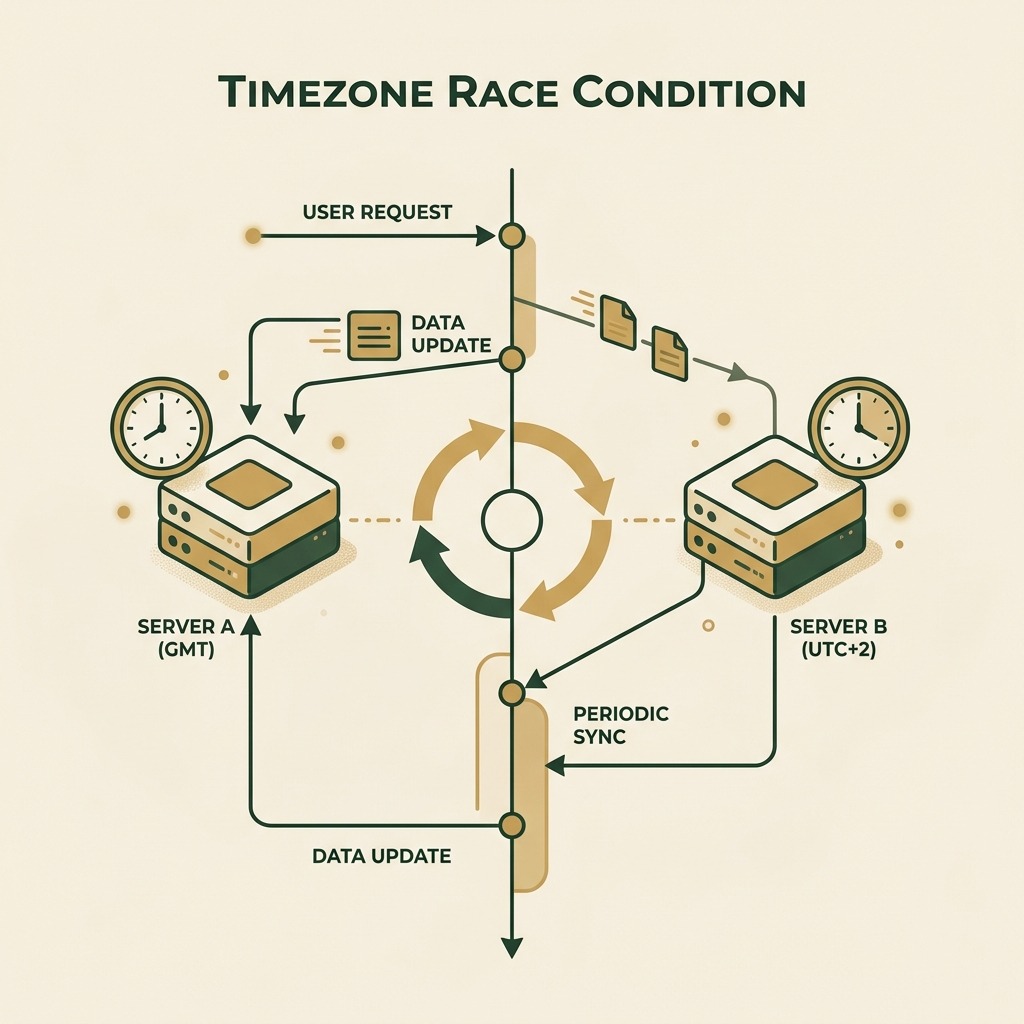
During high-load periods, the delay in the queue shrunk to milliseconds. If Server A sent a message at 14:30:00.500 GMT, and Server B (running slightly fast or misinterpreting timezone offsets) processed it at what it thought was 14:30:00.400 GMT, the transaction looked like it arrived 100 milliseconds before it was created.
The Fix
We immediately refactored all date serialization to strict ISO 8601 UTC strings (new Date().toISOString()) and added a linter rule to block raw local string formats.
The Lesson: Never trust stringified date formats. Keep your servers aligned to UTC, and force your APIs to communicate in absolute epochs or explicit UTC offsets.
2. The Rogue Space Character That Broke Authentication
A few years ago, we pushed a minor release to our user gateway service. Within minutes, users started reporting that they were randomly logged out, and new logins were failing with a generic 500 Internal Server Error.
We checked the diff. The only change was the addition of a new API key config for a third-party analytics provider.
We reverted the change, and the system stabilized.
But why did adding a config variable break authentication?
We inspected the .env file templates and the production configuration variables. The config manager had copy-pasted the new API key into the environment manager.
Crucially, they had accidentally copied a trailing space character at the end of the key:
ANALYTICS_API_KEY="prod_3f8a9d1c7e6b5a49 " # Spot the trailing space!
Our authentication system used a custom middleware that parsed the environment configuration block. It loaded the variables using a parser that didn't automatically trim trailing whitespace.
Later in the auth flow, we used a cryptography helper to sign JSON Web Tokens (JWTs) using a combination of our app secret and the analytics key for tracking session signatures. The helper hashed the values. Because of the trailing space, the generated signature had an extra character block.
When users navigated between pages, the load balancer randomly routed them to instances that had the old config (no space) or the new config (with space). If a token signed by a "space-configured" instance was verified by a "no-space-configured" instance, the verification failed.
It took us three hours of staring at logs to realize that the analytics key was 37 characters instead of 36.
The Fix
We added automatic trimming to our environment parser:
const value = process.env[key] ? process.env[key].trim() : '';
The Lesson: Sanitize and validate every external input, including your own environment variables and config flags. What looks like harmless whitespace to a human is a critical syntax change to a computer.
3. The Recursive Log Loop (The "Log Bomb")
This is my favorite because of how spectacular the failure was.
We had a Node.js background worker that processed queue messages. We wanted to make it more resilient, so we added a custom error handler that would log any uncaught exceptions to a remote logging aggregator (like Sentry or Datadog) over HTTPS.
process.on('uncaughtException', async (error) => {
  try {
    await logErrorToRemoteServer(error);
  } catch (loggingError) {
    console.error('Failed to log error remotely:', loggingError);
  }
});
One day, our logging service suffered a minor outage and started returning 503 Service Unavailable responses.
When our background worker encountered a minor database timeout, it tried to log the error. The log request failed because the logging server was down.
The logging helper threw an exception: Error: HTTPS connection failed.
Since this exception was uncaught within the async flow of the handler, the uncaughtException handler caught it... and immediately tried to log that error to the remote server.
Which failed.
Which triggered another uncaughtException.
Which tried to log the error again.
Within seconds, the background worker entered an infinite recursive loop of generating error logs. It started consuming 100% CPU and spitting out millions of lines of local console logs.
The disk on the container filled up in less than 3 minutes. Because the disk was full, the system could no longer write swap files or session data. Other microservices on the same host crashed immediately. It was a self-inflicted Distributed Denial of Service (DDoS) attack.
The Fix
We decoupled the error logging logic and added a circuit breaker. If the error logging system itself fails, write to a local backup stream and stop attempting network requests for a cool-down period.
The Lesson: Never let your error handlers throw errors. Your telemetry and logging systems should fail silently and gracefully.
Preparing for the Unexpected in Interviews
These kinds of production stories are exactly what senior interviewers look for when asking behavioral questions. They don't just want to know if you can write a binary search algorithm; they want to know how you react when the systems you build start behaving in unexpected ways.
When you're preparing for your next engineering role, make sure you can articulate these stories using the STAR method (Situation, Task, Action, Result).
If you want to practice answering behavioral engineering questions or mock-interview yourself on real production scenarios, tools like totop.app let you generate customized interview prep scenarios for any job description. It's a great way to structure your thoughts and ensure you shine when sharing your own production war stories.
Stay safe out there, keep your logs trimmed, and remember: UTC is your friend.