5 Common Python Mistakes That Will Tank Your Technical Interview

I remember my first real technical interview for a backend Python role. I was feeling pretty confident. I had built a few side projects, knew my data structures, and even grinded some algorithmic challenges. Then, the interviewer asked me a seemingly innocent question about default arguments in a function... and I completely froze.
Looking back, it wasn't the complex algorithms that tripped me up—it was the fundamental Python quirks that I hadn't fully grasped. Python is famous for being incredibly readable and intuitive, but that simplicity can be deceptive. It's really easy to write code that looks right but behaves in completely unexpected ways.
If you're gearing up for a technical interview, you're going to want to avoid the classic traps that interviewers love to test for. Here are five of the most common Python mistakes candidates make, and exactly how to fix them before your next big loop.
1. The Mutable Default Argument Trap
This is, without a doubt, the most classic Python "gotcha." I’ve seen countless candidates fall for this one, and it's almost guaranteed to pop up in a mid-level Python interview.
Take a look at this code:
def add_item(item, item_list=[]):
    item_list.append(item)
    return item_list

print(add_item('apple'))
print(add_item('banana'))
If you expect the output to be ['apple'] and then ['banana'], you're in for a surprise. The actual output will be:
['apple']
['apple', 'banana']
Why this happens: In Python, default arguments are evaluated only once, when the function is defined. They are not evaluated every time the function is called. Because a list is mutable, that single list object is shared across all calls to the function that don't provide their own item_list.

The Fix: Always use None as a default value for mutable objects, and initialize them inside the function block:
def add_item(item, item_list=None):
    if item_list is None:
        item_list = []
    item_list.append(item)
    return item_list
2. Misunderstanding Variable Scope (The UnboundLocalError)
Have you ever tried to modify a global variable inside a function and gotten an angry UnboundLocalError? It’s a very common mistake when candidates are trying to manage state during an algorithmic interview without passing variables around properly.
counter = 0

def increment():
    counter += 1
    print(counter)

increment() # Raises UnboundLocalError!
Why this happens: When you try to assign to a variable (counter += 1 is essentially counter = counter + 1) inside a function, Python automatically assumes it's a local variable. Since it hasn't been defined locally yet, it throws an error before it even looks for the global variable.
The Fix: You need to explicitly tell Python that you intend to use the global variable using the global keyword.
counter = 0

def increment():
    global counter
    counter += 1
    print(counter)
(Pro Tip: While this works, a better approach in an interview is often to refactor your code to avoid globals entirely, perhaps using a class or returning the updated value.)
3. Ignoring Pythonic Idioms (Writing "C in Python")
Python has a very distinct style, often referred to as being "Pythonic." If you write Python like it's C or Java, you'll get the job done, but you'll signal to the interviewer that you don't fully understand the language's capabilities.
A classic example is iterating over a list using an index when you don't need to.
The "Spaghetti" way:
my_list = ['a', 'b', 'c']
for i in range(len(my_list)):
    print(my_list[i])
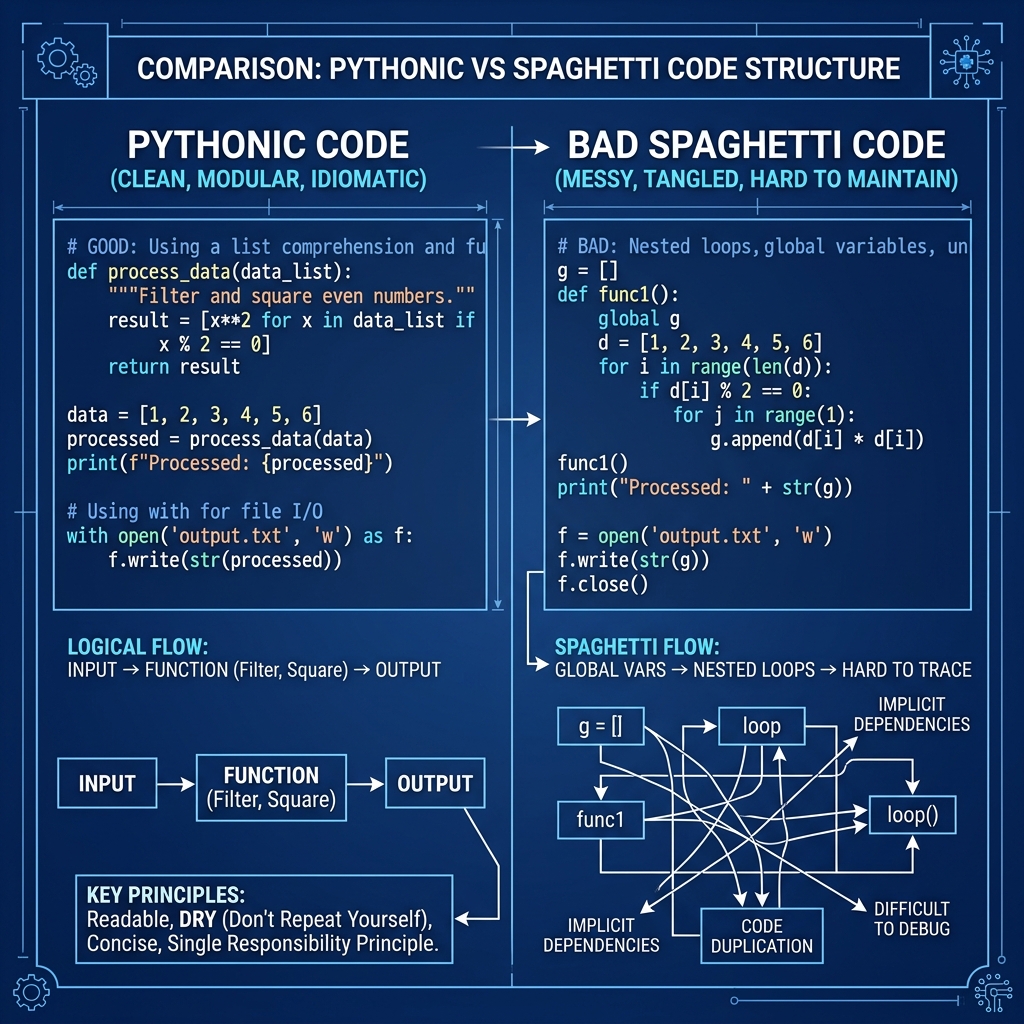
The Pythonic way:
my_list = ['a', 'b', 'c']
for item in my_list:
    print(item)
If you do need the index, use enumerate():
for index, item in enumerate(my_list):
    print(f"{index}: {item}")
Interviewers are looking for clean, readable code. Using list comprehensions, generator expressions, and built-in functions like zip() and enumerate() will make your code stand out.
4. Copying Lists Incorrectly
If you're dealing with matrices or needing to keep an original copy of an array while you mutate another (common in dynamic programming or backtracking problems), getting copying wrong will ruin your logic.
original = [1, 2, 3]
new_list = original
new_list.append(4)

print(original) # Outputs: [1, 2, 3, 4]!
Why this happens: The = operator doesn't create a new list; it just creates a new reference to the exact same object in memory.
The Fix: Use slicing [:], the list() constructor, or the copy module for shallow copies.
new_list = original[:]
# or
new_list = list(original)
Note: If you have a list of lists (like a 2D grid), a shallow copy isn't enough. You'll need import copy and copy.deepcopy() to avoid referencing the inner lists.
5. Overusing try...except Without Specifics
Error handling is great, but a bare except: block is a massive red flag in an interview. It catches everything, including KeyboardInterrupt (so you can't even Ctrl+C out of an infinite loop easily) and SystemExit.
try:
    result = 10 / 0
except:
    print("Something went wrong!")
Why this is bad: It masks the real errors you actually want to know about during development and debugging. It makes it incredibly difficult to figure out why a script failed.
The Fix: Always specify the exact exception you anticipate. If you must catch a broad range of runtime errors, catch Exception (which excludes system-exiting exceptions), but even then, try to be more specific.
try:
    result = 10 / 0
except ZeroDivisionError:
    print("You can't divide by zero!")
Level Up Your Interview Game
Technical interviews are stressful, but removing these common Python pitfalls from your habits will give you a massive advantage. You want the interviewer focusing on your problem-solving skills, not stumbling over a mutable default argument bug.
If you want to practice your technical communication and ensure your code is solid before the real thing, try out the mock interviews on totop.app. It’s a great way to simulate the pressure and get comfortable explaining your thought process out loud. Keep practicing, stay Pythonic, and you'll nail that next loop!